TIME IS RUNNING OUT FOR 2026 TAX WRITE-OFFS

Can a Court Reporter Mark an Exhibit Change Without Pausing the Recorder?

Rehearse marking exhibit changes during continuous deposition audio. Compare a recorder mark, file split and written time reference, then test the reviewing copy.
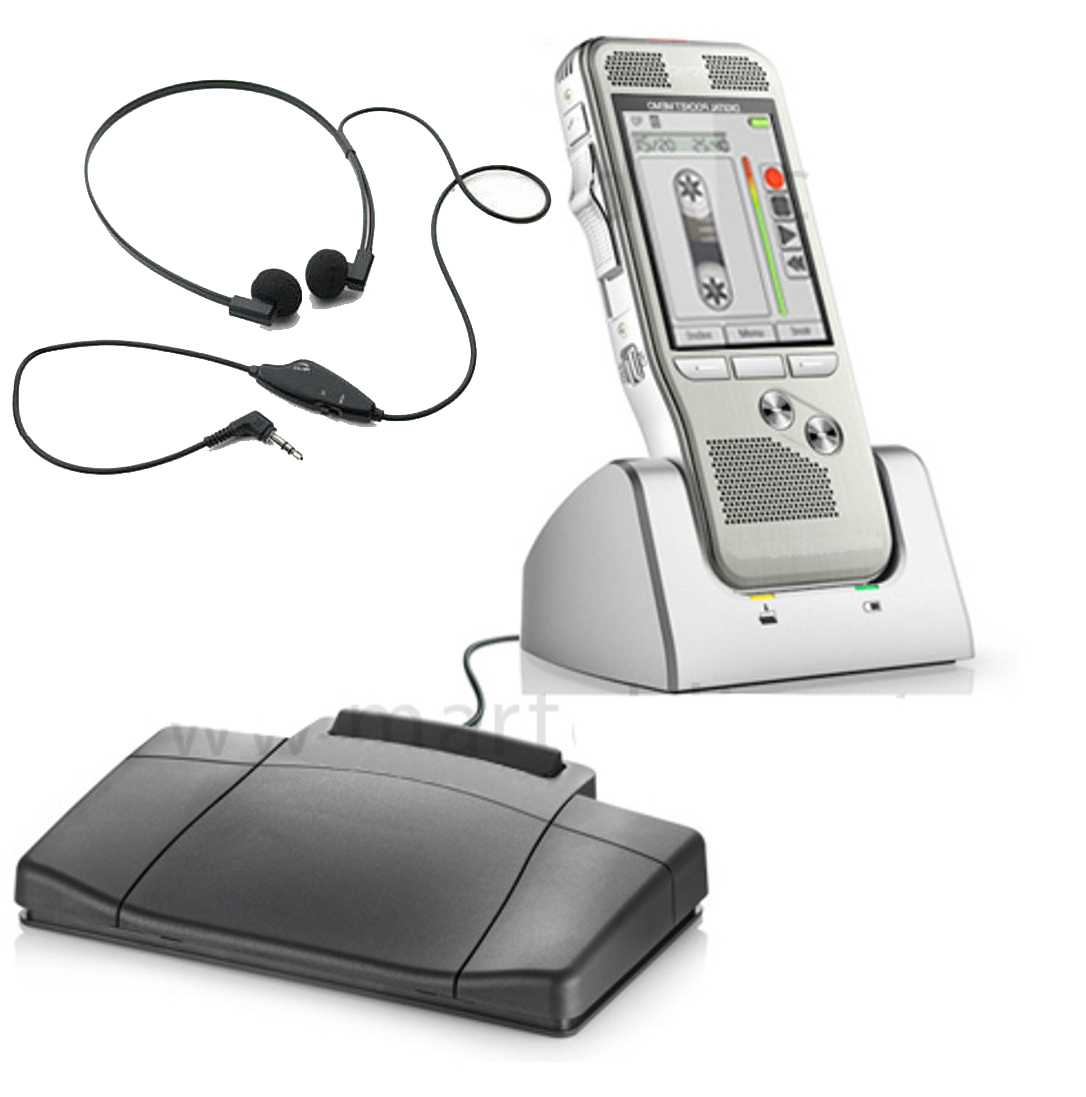
Court Reporter 5000 in its dock, wired earpieces and transcription foot pedal
Court Reporter 5000 Recorder and Transcriber. View Martel’s product details for SKU 1491.

A recorder that supports adding a mark during active recording can give a court reporter a playback point for an exhibit change while speech continues. Whether the mark survives the trip to a scopist depends on the recorder, format, transfer and player. Start with the exact model instructions. In a training file, mark a harmless exhibit change between two distinctive phrases, then play through the change without seeking. Next try jumping to the mark on the recorder and on a copied file in the review software. That sequence checks whether the file contains a continuous exchange and whether someone else can find it reliably.

Decide which event the mark is meant to locate

A document can arrive on the table before anyone identifies it. Counsel may then refer to a proposed number, the official may clarify that number, and only later might someone ask the first substantive question about a particular page. These are distinct audible or visible events. Decide what a working exhibit mark should lead the reviewer to in your own procedure. For a practice routine, you might place it when the authorized speaker first says the assigned exhibit identifier. The reviewer can then back up slightly to hear the approach.

Avoid using a recorder mark itself as proof of the identity, status or admission of an exhibit. The reporter’s action can create a convenient point in the audio. The applicable proceeding and its authorized participants determine what was identified and how it is described in the record. Use practice notes to distinguish “document arrived,” “identifier spoken,” and “discussion began” if that distinction helps a reviewer. A small difference in labeling can prevent a reader from assuming the mark establishes something that only the spoken exchange can establish.

Choose an event the reporter can recognize while attending to the actual proceeding. A repeated action that relies on watching another screen or locating a delicate control can distract from the words being taken down. If it is difficult to place a mark at the desired syllable, use a written elapsed time and a brief description or ask a designated operator to handle the device in accordance with your procedure. A slightly late mark paired with a clear reference is more useful than a precisely timed mark that nobody can interpret.

Learn the difference between an index mark, a file split and a pause

A mark generally identifies a point for later navigation while leaving the recorded passage in its file. A file split creates another file at a boundary. A pause interrupts active capture for an interval. Some devices use terms such as track, index, cue, bookmark or divide, and software may use similar words for different operations. Check the operation, not just the label. The question to ask is whether the command writes a timestamp-like reference, begins another file, or stops collecting sound during the transition.

The ICD-UX570 and UX570F help guide gives one concrete example. On those models the documented T-MARK control can add a track mark while recording is in progress. The guide describes locating it during playback, and separately mentions that a mark can identify a point for dividing a file later. Creating the mark is therefore a distinct action from actually dividing. The same control behavior cannot be assumed for a different handheld recorder or a rebranded reporting bundle.

The DR-40X reference manual gives another example with a differently labeled control. It describes adding a mark at the current point with ENTER/MARK during recording, and its recording section describes separate controls for increasing the track number by starting another file. This is why testing a button labeled “track” from memory can produce an unexpected result. Use these examples to frame the purchasing or support question for your own model. Have the exact manual and operating mode in front of you when practicing the actual command.

Set up an exhibit-change exercise that a second person can score

Use a blank cover sheet with a training identifier such as “Maple Four.” One volunteer reads the neutral question, “Which side has the blue edge?” A second volunteer states, “This sheet is marked Maple Four for practice,” then answers, “The blue edge is on the left.” The operator places the test mark on the agreed cue. Make the following response plain enough that the reviewer can tell whether the first word survived. Keep the practice script and its answer key separate from the audio operator.

Put the recorder in its normal practice format and start a fresh file. Let the elapsed clock run through several seconds of ordinary speech before the cue. When a colleague performs the mark operation, the reader continues naturally without waiting to be told it worked. A real exhibit change can occur while someone is still speaking. A practice session that pauses all voices for five seconds around the control could conceal an accidental pause or a loud mechanical click.

Write the file identifier, a rough elapsed time and the expected marker number if the recorder displays one. The reader should avoid tapping the microphone or announcing the practice mark on the operator’s behalf. A spoken label would create another navigational cue that could be mistaken for the electronic one. Use the exhibit identifier spoken in the natural exchange to identify the content, and test the recorder’s navigation separately. Those independent observations give the exercise a clear result.

Verify continuous audio before trying the jump command

Stop and finalize the rehearsal file normally. Start playback well before the exhibit change, leaving enough lead-in to hear the whole question. Listen at ordinary speed through the marked point, and ask a fresh listener to write the last two words before the cue and the first two afterward. Compare their notes with the script. If a word disappears, sounds abruptly clipped or is buried by a button noise, record that finding even if the recorder displays a mark exactly where you expected.

Play the same passage without touching any controls during a second, otherwise similar test. If both versions lose the same quiet response, the microphone position or recording input may be responsible. If only the marked run loses the beginning, investigate whether the chosen operation paused, split or generated a mechanical sound in the mic. Run another test with the operator’s hand away from the recorder for the baseline. A strong suspicion about the mark button is less informative than a difference that appears consistently when it is used.

Only after confirming the speech exists should you test navigation. Use the recorder’s documented next-mark or previous-mark operation from several seconds away. Observe where playback begins relative to the identifier. Some controls find a marked point and wait for Play, while other workflows begin playing after the jump. Learn the action and resulting state for the precise equipment. A reviewer expecting immediate sound can mistake a successful seek followed by a paused player for an absent mark.

Build a written index that still works without electronic marks

Build a written entry from the practice file identifier, elapsed position within that file, neutral exhibit reference and event that happened there. “File B, 00:12:44, Maple Four, number first spoken” gives a colleague a usable starting point. Avoid relying on “mark three” alone. A mark number is local to how the recorder or player counts it and may restart in each file. A change in the list can shift what “three” means.

Time of day can be helpful for reconstructing an assignment, but the playback cursor usually shows elapsed time from a file or segment. Record which kind of time an entry uses. Two files created before and after lunch can both contain 00:12:44. If all the written notes refer simply to twelve minutes, the reviewer must guess which file to open. An actual filename or approved segment identifier resolves most of that uncertainty without requiring personal information about the participants.

Use wording a colleague can search even if the exhibit identifier is later corrected. During a practice recording, have a speaker initially say “Maple Five,” then correct it to “Maple Four.” Place one note at the first reference and another at the correction if that is the chosen routine. Retain what happened at each point in your practice index. Replacing the original note with the corrected number alone may send the reviewer to a passage where the first spoken words seem to contradict the note.

Make separation between the recorder operator and exhibit handler explicit

A reporter who receives a document, tracks the speaker, writes the exchange and reaches for a recorder at the same instant faces a practical attention problem. Decide in advance which of those actions has priority and whether another authorized person handles the equipment or exhibit. Keep the control within reach without crossing an exhibit or a speaker’s working area. A larger table makes this especially important. A recorder placed for good microphone coverage may be inconvenient to touch while the reporter is writing.

If a separate operator will add marks, agree on an observable cue. In a rehearsal, the identifier spoken aloud may be more reliable than a hand movement hidden behind a display. Tell the operator what to do if the cue is ambiguous or comes during an overlapping objection or another simultaneous exchange. One sensible practice response is to make a note of the approximate elapsed time and observable words, then clarify later through the authorized procedure. Avoid assigning the operator responsibility for deciding an exhibit’s formal status.

A relief operator needs a short written handoff describing the current file, next expected mark and location of the index. Demonstrate the actual command with neutral material and ask them to replay the words on each side. Have them find one earlier marker before they attempt to create a new one. Being able to locate a mark proves they recognize the navigation state, reducing the risk that a button used for playback will be mistaken for an active recording command.

Confirm what survives copying and conversion

Locate the original test file using the recorder’s documented process. Copy the rehearsal, including any project or supporting data the manufacturer specifies, to the approved review location. Leave the original intact. Open the copy in the application a scopist actually uses, not just the first player associated with the filename extension. Listen through the mark time and then examine the program’s navigation or marker list. A working audio stream and a usable marker list are separate capabilities.

A recorder may store its markers within a file or in related information associated with that file, depending on model and format. A player may play the underlying audio while ignoring that information. An exported or converted version can change the container and omit indexing fields even when the words remain audible. A rendered waveform, a badge showing one track or a matching duration does not establish marker support. Verify by jumping to a known test event using the actual copied material.

Keep an acceptance note with the file types and review path that passed. For example, a practice note may say that the native recorder finds marks two and three, the original copied folder opens with mark navigation in the intended software, and an audio-only delivery copy needs the written elapsed-time index. This is a model-and-workflow finding from your own rehearsal. Do not promise the same result for a different software version, another export mode or a file converted by a separate recipient.
Coordinate exhibit references across multiple files and channels

An exhibit discussion can start near the end of one file and continue into the next. A marker created before the boundary may belong only to the first file. An elapsed-time note made later may refer to a clock that has restarted. Put the file identity and, if applicable, the reel or session identifier in the index before entering the time. Where a recorder automatically creates segments, check the manual for how marks are stored and whether a reviewer can navigate across those boundaries.

On a multichannel recording, determine whether a mark applies to a whole project, a particular audio file or a channel within the reviewing program. Choose a harmless event audible on the channels you need and ask a scopist to find it while listening to the witness track and then to counsel. If the markers appear in one view but not another, a written file-time reference can still take the reviewer to the same passage. Document which reference clock they should use.

For a practice sequence with three exhibits and two files, have a colleague select the references out of order. Start with the last exhibit, then find the first and then the middle one. A setup can look reliable when the operator simply plays the day in order. Random access tests whether the file labels, marker numbers and short descriptions are strong enough for somebody who needs a single passage without hearing the preceding half hour.

Diagnose late marks and a click on the recorded words

A human operator may press the control after hearing the exhibit number, especially when taking down simultaneous speech. A mark that lands one or two words late can still be a good navigation aid if the written note establishes that the reviewer should back up to the start of the exchange. A mark is generally a place to begin looking. It cannot by itself determine the exact start of an exhibit’s discussion. Keep the operator’s practice notes honest about how precisely the mark was placed.

The DR-40X manual notes that pressing a physical button can be audible through its built-in microphones. Other setups can also carry handling sound through a supporting surface or cable. During rehearsal have the operator press the intended control while a volunteer says a short number at ordinary levels. Compare a hands-off pass with the mark pass. If a clack masks the number, test an approved placement or documented remote-control method for that device, or use an elapsed-time note while speech is active.

Avoid solving button noise by requesting an automatic pause around every exhibit. The resulting quiet gap could remove questions, corrections or objections that the reporter needs to hear. Listen for specific causes of masking, such as the operator tapping the case, the cable brushing a stand or the mic picking up controls placed too close. Try one change and repeat. A practice score should measure whether words remain intelligible across the event, as well as whether the electronic marker can later be selected.

Choose a recorder and review package using the same exhibit task

When considering Martel’s Court Reporter 5000 Recorder and Transcriber, ask whether the exact supplied recorder, selected format and included review arrangement support adding and locating a mark during recording. If you expect a scopist to navigate by marks using a foot pedal, ask what the pedal controls and where that software exposes the marks. A pedal that starts and stops playback is useful without necessarily offering a jump to a named exhibit or a recorder-created mark.

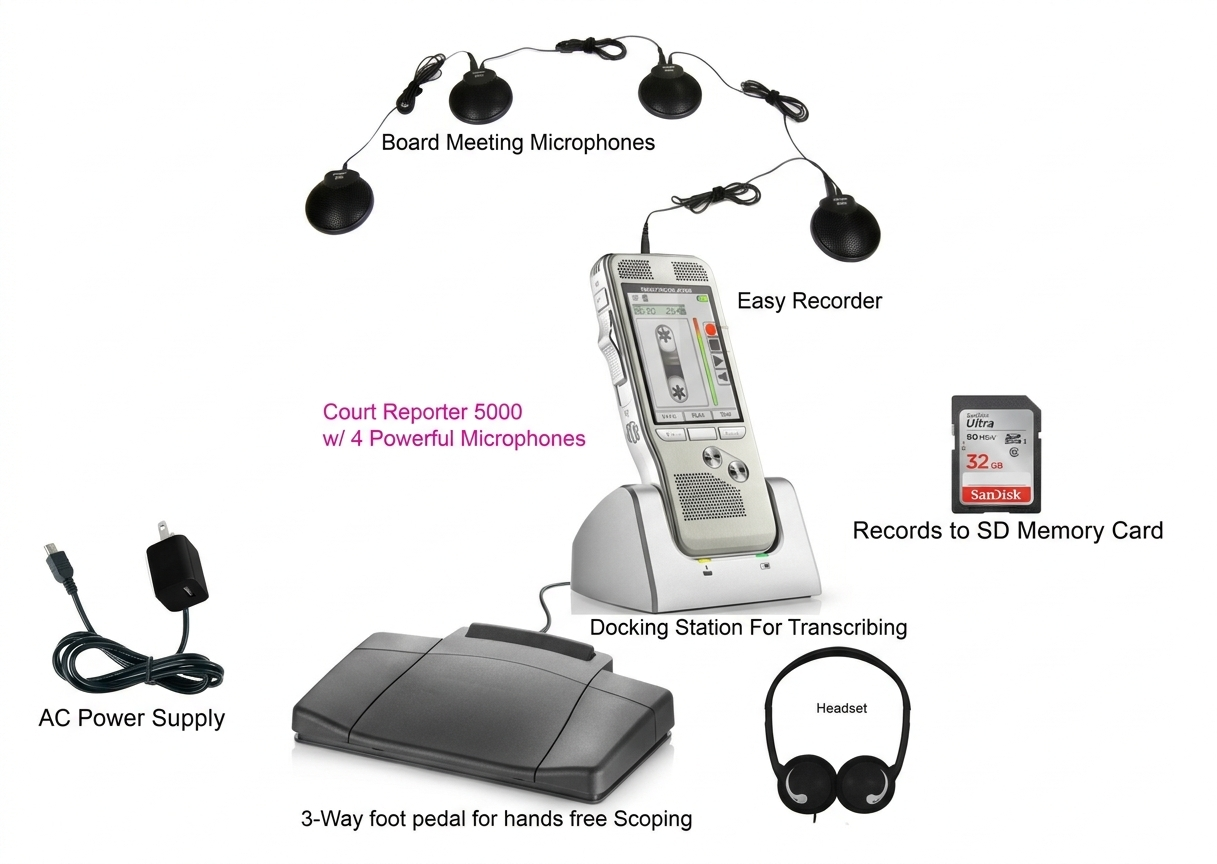
The Martel Court Reporter 5000 four-microphone courtroom package adds another question about responsibility. The recorder may need to sit where several pickups reach it, while the operator needs to reach a control without bumping a microphone. Give Martel your room sketch and describe who handles exhibit references. Ask for a supported recording and transfer method on the specific kit. The availability of multiple microphones says nothing by itself about the number of mark slots, how marks are indexed or whether a converted file preserves them.

A purchasing trial can be short and decisive. Have one operator record three neutral exhibit changes without losing the speech between them, then give the resulting material to a different reviewer. The reviewer should be able to locate requested events out of order using the intended software, or locate them from the written elapsed index if electronic navigation is unavailable. Capture their findings beside the equipment model, file format and transfer method. That gives the team a concrete description of the workflow it is purchasing.

Practice a missed marker and a corrected identifier

Create a training file that contains four changes. For the first, place a mark normally. For the second, ask the operator to skip it deliberately and keep a rough elapsed-time note. For the third, have the questioning volunteer read a provisional identifier and correct it twenty seconds later. For the fourth, create the mark late, after the practice witness has started the response. This is an invented exercise. Its purpose is to teach navigation when the mark list is imperfect, as well as when every operation works.

Give another reviewer only the written index and the authorized practice copy. Ask them to find the discussion for each final identifier and to return the first spoken description that actually appears in the exchange. If the unmarked event cannot be found, improve the written entry by adding a distinctive audible word and the correct file identity. If the correction is mistaken for a different exhibit, distinguish the initial identification and correction in the index. If a late mark lands in the middle of the answer, record how much lead-in the reviewer needed.

Score the exercise by outcomes rather than the number of visible markers. A reviewer who finds four events, identifies the correction correctly and hears both sides of every transition has a useful handoff even with a missed electronic mark. A perfect row of four icons does little for the team if one points into another file or the note incorrectly labels a proposed exhibit as admitted. Repair the navigation note through the proper process and preserve the original recording.

32 questions and answers

1. Which control should I press when counsel identifies an exhibit?

Look for the documented function that places a mark while your particular recorder is actively recording. Controls labeled Record, Index, Mark or Track can behave differently by model and operating state. In practice, have counsel’s stand-in keep speaking while you try the specified command. Play through the boundary and test the jump afterward. Use that rehearsed model-specific action instead of copying a button sequence from another recorder.

2. Does adding a mark change the official exhibit number?

An electronic mark is a position recorded by equipment or software for navigation. It does not assign a formal exhibit identifier. Use the identifier established through the proceeding’s own process and clarify ambiguity through the appropriate official. In a practice worksheet, separately record the time, marker number and spoken exhibit reference. This avoids equating the recorder’s “mark 4” with an exhibit legally identified as number four.

3. How can I tell whether I accidentally paused the recording?

Listen continuously from before the marked point through the following sentence. Have a practice partner use an exact neutral phrase across the transition and compare it with what the file contains. Check the file duration and whether the recorder made another file. A silent interval, an abrupt jump between words and an ordinary pause in the conversation have different implications. Compare the test with a hands-off recording if the result is ambiguous.

4. What does a blinking track-mark symbol mean?

Read the display key for the exact unit. On the ICD-UX570 and UX570F, the manufacturer describes the mark indicator flashing three times after adding a track mark. A flashing symbol on another recorder can mean something else, including a different transport state. In rehearsal, confirm that the same file continues to capture speech and that the new point appears when you navigate the completed recording.

5. Is there a maximum number of exhibit marks per file?

Some equipment imposes a limit. The ICD-UX570 family help guide documents up to 98 track marks in one file. That figure is a model-specific example, not a specification for the Court Reporter 5000 or any other recorder. Check your unit’s manual and practice what the display does when a mark cannot be added. Use a written elapsed-time index to keep a reference when electronic marks are unavailable.

6. Can two marks close together point to different corrections?

They may, depending on the recorder’s minimum spacing and how the player navigates them. Rehearse two harmless changes only a few seconds apart and try jumping to each from both directions. If the player repeatedly lands on the same mark, distinguish the correction in the written entry with its elapsed time and audible wording. That gives the reviewer a usable clue even if the device groups nearby points.

7. Should I name a mark with the witness’s name?

Use the approved naming procedure and include only the information necessary for navigation. A concise exhibit reference and audible event will often be more useful than a person’s name, particularly when several people discuss the same item. If the recorder only assigns numbers, keep the reference in the authorized index. For a practice run use invented labels so the test contains no identifying case or participant information.

8. If my recorder only shows index numbers, how can a colleague locate a named exhibit?

Create a cross-reference with the approved exhibit identifier, file identifier, mark number and approximate elapsed position. For example, “Practice File B, Maple Four, mark 6, 00:18:12, identifier corrected” tells a colleague what to open and what to expect. Ask a second person to use the entry before the day’s exercise ends. If they must hear the whole preceding discussion, add a more distinctive audible cue.

9. Can a mark be added afterward when one was missed?

Some devices or applications support creating a marker during playback. Follow the applicable handling rules and preserve the original recording. A separate working index or an authorized review copy may be the appropriate place for a later navigation reference. Distinguish a retrospective reference from one made during the session. A later mark can help locating material without establishing the exact time the operator first observed an exhibit change.

10. Why does the mark appear on the recorder but not in my computer’s default player?

The player may support decoding the sound while ignoring recorder-specific marks or associated project data. Confirm that you transferred the complete required set of rehearsal files, then try the intended review software and consult both products’ instructions. If the person receiving an authorized copy uses another player, include an elapsed-time reference that works there. An absent marker display alone does not establish that speech is missing from the audio.

11. Can I send an MP3 conversion and expect the markers to follow?

Do a fresh test of the exact conversion and receiving player. Converting an audio file can change or discard metadata even when the words sound intact. Create known marks in a harmless original, convert by the proposed route, reopen the derived file and try jumping to them. If the audio plays but marks are unavailable, use an approved written time index for that version and retain required originals according to procedure.

12. What if the recorder gives me a new filename each time I press the button?

Check whether you selected a new-file or track-increment command rather than the mark command. Compare how the manual describes the two. In your training folder, play the end of the first piece and the start of the second to see whether the words remain continuous. Decide whether several files suit the reviewing workflow. If the intention is navigation within a single file, rehearse the separate supported operation.

13. What if the marker lands a few seconds after the exhibit number is spoken?

Write a note that the relevant exchange begins before the marked point and give a short audible phrase to find. During practice, the reviewer can jump to the marker, step backward with the normal playback control and hear the complete identification. If all marks are routinely late by a similar amount, adjust the operator cue or procedure. Do not represent an approximate marker as an exact boundary of the official event.

14. What should be indexed if an attorney hands up several pages at once?

Use the index to reflect the audible, authorized identification rather than guessing that each sheet is a separate exhibit. If individual pages are discussed under one identifier, a page reference or distinctive phrase can help navigation. If several distinct identifiers are assigned, create separate entries when practical. For the practice trial, include one packet with two page references so a reviewer learns to distinguish a new exhibit from discussion of another page.

15. Should a physical binder tab produce an audio mark?

Only when it corresponds to an event the agreed indexing procedure is meant to locate. A colored tab moving past the microphone may have no spoken significance and might relate to a document already under discussion. If the actual identifier is given later, use that audible reference or document the distinction in an authorized working note. Keep your equipment routine tied to events another reviewer can recognize.

16. Is it helpful to say “mark” aloud every time I press the button?

Follow the proceeding’s own direction about spoken announcements. Extra words can interrupt the exchange or create confusion over who identified what. For an equipment exercise, use words that naturally signal the practice change and test the electronic mark independently. If the system supplies only an audible cue in the file, it is a different workflow from a selectable electronic marker. Identify explicitly which type of reference you are creating.

17. How should I handle a reused number from a different session or volume?

Include the session, file and the approved identifier exactly as established in that portion of the proceeding. A short index label such as an exhibit number alone may recur in another file. In rehearsal, use the same number in two practice sessions with different file identifiers and ask a colleague to retrieve both. Add the event or a few neutral identifying words to the entry if the file labels still leave room for confusion.

18. Can I rely on the color of a waveform flag to tell which exhibit it means?

Colors may be configurable and can change between applications or users. If your system supports written labels, put the relevant identifier there using the authorized convention. Keep an elapsed-time index for recipients whose player does not show the same flag. During training have the reviewer navigate using the words and file identity rather than a color cue alone. This also makes the handoff more accessible to operators who distinguish colors differently.

19. Does moving a cursor during playback alter an existing mark?

Usually a playback position and a stored marker are separate concepts, but you should verify how your particular program treats editing, selection and marker movement. Practice with a copied file. Move the cursor away, close and reopen the project, then find the marker again through its dedicated navigation control. Avoid dragging a flag or choosing a delete or clear command while trying to inspect the original recording.

20. What if a protected file will not accept a track mark?

Respect the handling and protection of that file. The ICD-UX570 help guide, for example, documents restrictions on adding marks to protected files. For an existing recording, use an approved separate index or an authorized review-copy workflow to create a navigation reference if appropriate. Do not remove protection simply to make an equipment rehearsal work. Create a new, permitted training file that can demonstrate the model’s mark operation.

21. How can the reporter avoid transmitting handling noise through the table?

Try moving the recorder controls and the microphone onto separate stable approved surfaces or routing the mic cable so a hand movement does not tug it. Use the recorder’s documented remote control only if one is supported and available. Compare a spoken number during a hands-off trial with the same position during a marked trial. Determine whether the click is in the saved audio, solely in the room, or both.

22. How does a foot pedal fit into an exhibit-mark workflow?

A pedal may handle play, pause, rewind or other functions in the reviewing software. It will locate recorder-created marks only if the particular software and configuration support that action. Ask the scopist to demonstrate finding a known exhibit with the actual pedal, keyboard or onscreen control they plan to use. The important test is reaching the correct passage efficiently, even if a separate manual mark list provides the route.

23. What if my reviewer hears all the words but cannot find any marker list?

Give the reviewer the written elapsed reference and the original file identifier so they can locate the practice event immediately. Then check whether their program has the relevant marker view, whether the imported format preserves markers and whether companion project data is required. Document which component lacks the navigation function. Preserved speech with missing metadata is a different situation from missing speech at the original transition.

24. Can a mark identify a displayed exhibit that nobody describes aloud?

It can point to an instant when the operator observed something, but audio alone cannot identify a silent image or establish its details. Follow the authorized process for identifying the display and seeking any needed clarification. In the working index describe the nature of the reference accurately. A note that a screen changed and a later utterance identified the exhibit is more informative than assigning an unsupported number to the silent moment.

25. Why might a reviewer land on the preceding mark when seeking backward?

Read the player’s navigation behavior near an existing marker. Some controls use the current cursor position or a recent playback boundary when deciding which point counts as previous. Begin the rehearsal seek from well inside the following passage and note the result. Give the receiving reviewer the approximate elapsed time as a fallback. A repeatable navigation quirk should not be mistaken for a missing exhibit reference.

26. Do elapsed marks remain accurate if someone listens at one-and-a-half speed?

A player may continue showing position on the original recording timeline even while audio plays faster, but verify that in the software the reviewer uses. The time shown by a separate wall clock while listening will differ from recorded elapsed time. Use positions reported on the original file’s timeline for the index. Test a known exhibit at two playback speeds to confirm the reader reaches the same original passage.

27. What should I record if counsel corrects both the number and the document description?

In an authorized working index, distinguish the initial spoken reference from the later correction, with file and elapsed positions for each. Describe the audible events concisely so the reviewer can hear them in sequence and follow the proceeding’s rules for formal labeling. An electronic mark near the correction can be helpful. It should not cause the earlier words to disappear from the working navigation notes or the preserved original.

28. How can an agency train several people to use the same mark convention?

Agree on one observable trigger for the routine practice, one file identifier format and one short event description. Let each operator index the same set of invented changes independently, then have a different reviewer retrieve the events using each index. Compare where the marks fall and whether the notes resolve differences. Change the wording of the convention when different operators consistently mark different stages of the same exhibit exchange.

29. What if there are so many changes that marking starts to compete with taking down the words?

Prioritize the reporter’s assigned duties and raise the coverage issue through the agreed procedure. During training, compare a detailed mark for every page turn with a smaller number of useful marks plus elapsed notes. Ask the reviewer to retrieve representative passages from each. If the simpler approach supports navigation while reducing missed speech or distraction, discuss it with the person responsible for the official workflow.

30. Is a file duration match enough to confirm continuous speech across a marker?

A matching duration can coexist with silence, input loss or a mechanical sound masking a word. Play through the change and identify the exact words on both sides. In a test, place a critical qualifier such as “before” or “after” immediately around the mark so a listener cannot pass the check by hearing the general topic. Also test the marker jump independently to confirm that navigation is useful.

31. How can I preserve the review instructions when software changes later?

Keep a short record of the original recorder model, file format, tested software, working navigation command and a written elapsed-time index. Rehearse again after an update with an approved training file containing known marks. If the new program can play the recording but exposes the marks differently, update the receiving instructions. Avoid converting a preserved original solely to recover the look of a previous playback interface.

32. How should a practice operator recover after pressing the marker twice for the same exchange?

Keep recording the authorized practice continuously and note the extra mark in the index. When the session is safely closed, verify where both points fall relative to the spoken identifier. If the team uses an editable working copy, follow its normal process for correcting navigation there. Knowing that two adjacent marks refer to one event is more valuable than interrupting the exchange to tidy the device’s numbering.

Martel equipment and related guides

Court Reporter 5000 Recorder and Transcriber · SKU 1491

Court Reporter 5000 courtroom package with four Audio Grabber microphones
Court Reporter 5000 four-microphone courtroom package. View Martel’s product details for SKU 1669.

Court Reporter 5000 four-microphone courtroom package · SKU 1669

This article is for educational purposes only.