A slide-switch dictation recorder puts commonly used recording and review controls on a physical slider. A push-button recorder uses separate buttons. Either can fit professional work; the useful choice depends on how you dictate, correct recordings and send them for transcription.
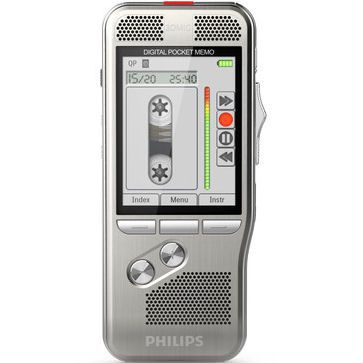
How slide-switch and push-button controls differ
A slide switch can make repeated record, stop, playback and review actions easy to locate by touch. The positions and functions depend on the recorder. Push-button equipment gives those actions their own buttons; some users prefer that layout for occasional notes or mixed recording tasks.
Philips lists slide-switch operation for its DPM8000 family and push-button operation for its DPM6000 family. This shows that professional dictation equipment can use either layout. It does not mean all devices in either group have identical features. See Philips’ control descriptions.
| Compare | Slide switch | Push buttons |
|---|---|---|
| Operating feel | Physical positions for supported functions; useful to try one-handed. | Separate controls; check their size, spacing and labels. |
| Corrections | Check whether the exact model and format allow insert, overwrite or append. | Check the same functions; buttons alone do not establish editing limits. |
| Audio and file handling | Depend on microphone design, settings, recording format and software. | Depend on those same factors. |
| Best purchase test | Dictate, review and correct a sample, then send it to your typist. | Run the same sample and compare the complete process. |
For lawyers, the correction process matters
When dictating correspondence, a file note or a document draft, you may need to revisit a sentence without starting again. Ask the seller to demonstrate the available correction functions. Inserting adds material at a chosen point; overwriting replaces existing audio; appending adds to the end. Availability can depend on the file format, so test the format your office actually uses.
Include instructions such as the document title, recipient and a clear indication of where dictation ends. Agree how your assistant should distinguish spoken instructions from words intended for the document. Clear working habits matter whichever recorder you buy.
Plan what happens after you press stop
Confirm how files leave the recorder, who receives them and which application opens them. Check required software licenses, docking or cable arrangements and whether a compatible foot pedal can control playback. A foot pedal controls supported playback functions; it does not turn speech into text by itself.
If your office uses speech recognition, confirm support for the exact file type and software edition. Review the draft against the recording. Neither a control layout nor a product label guarantees accurate names, dates or case details.
Do not assume features from the control style
Encryption, author identifiers, priority flags, hands-free functions and automatic routing are model- or software-specific. Obtain a current list of what is included and what needs configuration. A slide switch is not proof that files are encrypted, and a push-button recorder is not automatically unsuitable for professional work.
A practical trial before you choose
- Record a short document containing names, numbers and a correction.
- Review and correct it using the recorder’s supported functions.
- Transfer the sample through your office’s intended route.
- Have the typist test the file, headset and playback controls.
- Check package contents, support, return terms and current availability.
Explore Martel dictation equipment
Compare the current configurations and included services before ordering.
View Philips slide-control recorderShop lawyer dictation equipmentNeed playback equipment? Explore the All N One digital transcription kit.
Common questions
Does a slide switch produce better recordings?
The switch controls operation. Recording quality also depends on the microphones, placement, environment and settings. Compare a saved sample rather than assuming one control style sounds better.
Can I use a smartphone instead?
Possibly. Compare editing, file access and your office workflow in our smartphone versus dictation recorder guide for lawyers.
For the complete purchase checklist, read our Dictation Machine Buying Guide.