Dragon® Professional v16 - Comes with Full Tech Support
SKU 1943
$599.00
On Sale
was $699.99 Save 14%
In stock
Dragon® Professional v16 - Comes with Full Tech Support
Product Details
Condition: New
Availability: In-Stock
Nuance Dragon Professional v16
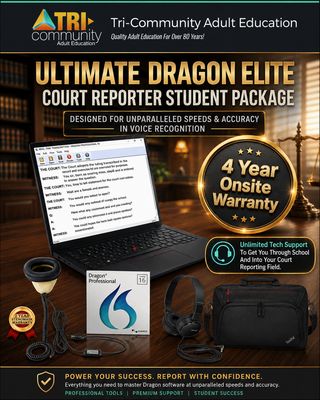
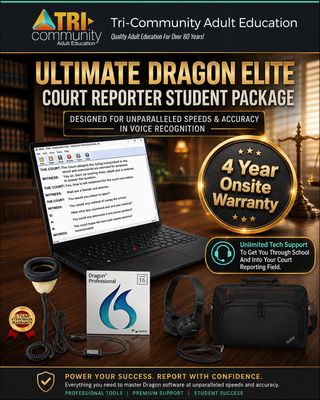
Dragon Professional v16 for Court Reporter Students
The same Dragon Professional v16 software—offered at Martel’s discounted student price.
Dragon Professional v16 helps professionals create documents faster and more efficiently using professional speech recognition, live speech-to-text, audio-file transcription, custom vocabularies, and powerful voice commands.
✓ Optimized for Windows 11 ✓ Compatible with Windows 10 ✓ Full Martel Tech Support
Student Offer
Dragon Professional
16
Premier speech recognition for Windows 11 and Windows 10.
✓ Dragon Professional v16 Software
✓ Full Martel Tech Support
✓ Free Remote Installation Help
YOU SAVE $100 Normally $699
3X
Faster than typing
Up to 99%
Recognition accuracy from first use
Front-End
Live speech-to-text
Back-End
Transcription from audio files
Dragon Professional v16
Professional documentation powered by your voice
Dragon Professional v16 helps professionals create high-quality documentation faster and more efficiently, reducing time spent on administrative work.
It supports both individual and group deployments for professionals working in document-intensive industries.
Documentation Productivity
✓ Create Documents by Voice
✓ Create Spreadsheets and Presentations
✓ Complete Form-Based Reports
✓ Work in the Office or on the Road
Dragon Professional Benefits
Faster dictation, transcription, and automation
Dragon Professional v16 combines professional-grade speech recognition with tools for document creation, transcription, customization, and workflow automation.
AI
Nuance Deep Learning Technology
Dragon adapts to the user’s voice and supports high recognition accuracy for users with accents and those working in open-office or mobile environments.
LIVE
Live Speech-to-Text
Dictate documents using front-end speech recognition rather than manually typing the content.
AUDIO
Audio-File Transcription
Transcribe recorded notes or voice files from another single speaker into text.
WORD
Custom Words and Vocabulary
Add industry-specific terminology and acronyms to Dragon’s built-in vocabulary.
AUTO
Custom Voice Commands
Insert standard text or signatures and automate multistep workflows using voice commands and macros.
WIN
Windows 11 Optimized
Dragon Professional v16 is optimized for Windows 11 and backward-compatible with Windows 10.
Superior Speed and Accuracy
Dictate documents 3 times faster than typing
Dragon Professional v16 provides up to 99% speech-recognition accuracy from first use, helping professionals capture information quickly while spending less time on paperwork.
3 Times Faster Than Typing
Up to 99% Recognition Accuracy
Accurate From First Use
Audio Transcription
Reduce transcription time and costs
Dragon Professional v16 can transcribe recorded notes or voice files from another single speaker back to the PC.
✓ Transcribe individual audio files
✓ Transcribe another single speaker’s prerecorded voice
✓ Process batches with Auto Transcribe Folder Agent
Workflow Automation
Streamline repetitive or manual processes
Dragon makes it possible to automate tasks and shortcut repetitive steps using custom commands and time-saving macros.
✓ Insert standard boilerplate text
✓ Insert signatures into documents
✓ Automate multistep workflows by voice
Vocabulary
Add words for your professional needs
Dragon includes an expansive built-in vocabulary that can be personalized with industry-specific terminology and acronyms.
✓ Add custom words and word lists
✓ Import and export industry terminology
✓ Modify word properties and edit vocabulary
Accessibility
Built with accessibility requirements in mind
Dragon extends Windows 11 accessibility capabilities into document creation and computer command-and-control functions.
✓ MouseGrid on multiple monitors
✓ Playback of dictated text in the user’s voice
✓ Sophisticated macro commands
Included With Your Martel Student Purchase
Full tech support and free remote installation help
Martel provides technical support for your Dragon Professional v16 student purchase. If you need help installing the software, Martel will provide free remote installation assistance.
✓
Full Martel Tech Support Technical support is included with this student purchase.
✓
Free Remote Installation Help Martel can remotely assist with installation if help is needed.
✓
Discounted Student Price Dragon Professional v16 offered by Martel at a college-student price.
System Requirements
Dragon Professional v16
Operating System Microsoft Windows 10 or 11
Windows Server 2016, 2019, or 2022
Memory Minimum 4 GB RAM
Drive Space 8 GB free hard-disk space
Product Download Internet connection required
Activation Internet required for automatic product activation
Dragon Professional v16 Student Offer
Professional speech recognition with Martel tech support and installation help
Get Dragon Professional v16 at Martel’s discounted college-student price, with full technical support and free remote installation assistance if you need help.
Package / Warranty Information
Dragon 16
Products related to this item