TIME IS RUNNING OUT FOR 2026 TAX WRITE-OFFS

Twenty questions about replacing a Marantz recorder

Which recorder should I compare first for a PMD661 replacement?

Start with the Sony-based PMD3 package when your previous arrangement depends on external XLR inputs or two identifiable sources. Give Martel the old model suffix and the sources you connect. Ask for the exact proposed routing and a sample file. If your old recorder was used only with its built-in microphones, compare portability and placement as well.

What is the practical replacement for a PMD620 used as a room backup?

Compare the S1 package if a compact recorder with built-in microphones fits the work. Use the intended placement and speaking positions when you test it. Confirm that the saved sample opens in the application you use after a job. Add a separate review setup if you need foot control.

Do PMD620, PMD620 MKII and PMD661 variants use the same accessories?

Match each accessory to the exact model. A connection that looks familiar can serve a different function or require a different power supply. The listing for Martel's legacy pedal names supported models. If your suffix is absent, request confirmation before ordering or connecting an accessory.

Can I plug my old Marantz foot pedal directly into the S1?

The S1 listing identifies no built-in remote pedal jack. If foot control is part of the work, plan to transfer a supported recording to a compatible transcription station and test the pedal there. Keep the old direct-control arrangement available for legacy use as appropriate.

Does the Sony-based PMD3 kit include a pedal?

Martel's current SKU 2028 listing includes a transcription foot pedal. Ask for the specific playback setup that goes with the quoted package. Confirm the device or program that receives its commands and demonstrate the functions you rely on, particularly if your old pedal connected directly to the recorder.

Can I use my XLR room microphone with the replacement?

Confirm its exact model, signal type and power requirement. The PMD3 listing describes XLR inputs and a phantom-power arrangement. Test the supplied or approved microphone on the correct input. For the S1's smaller input, ask about a compatible source or an appropriate external interface.

Is an XLR socket always a microphone input?

Read the label and documentation for the actual receiving device. Some inputs support different modes or levels. Identify whether the connection will receive a microphone or a line-level feed, how it is configured and whether the source needs power. Use a test recording to check the result.

Can I keep my mask on one channel and the room on the other?

Identify the mask and room microphone, the supported simultaneous input configuration and the selected recording mode. Make a sample where each source is easy to identify. Check both channels on the recipient's review system. That saved result answers whether the intended separation survives capture and transfer.

Do I need to use external microphones with the S1?

The S1 includes built-in microphones. If they capture usable speech from the planned position in a representative room test, they can serve that arrangement. If a required voice is unclear or a feed must be received directly, evaluate placement or a supported external connection and repeat the test.

Can the same card move between my old Marantz and the new recorder?

Check the required physical size, card standard, capacity and preparation instructions for both models. Keep the old recordings safe through the authorized transfer procedure. Use the supplied or otherwise approved media for the new device and make a test before relying on it for an assignment.

Should I choose WAV or MP3 on the new recorder?

Use the approved recording mode that meets your source and review requirements. Confirm the receiving application, channel layout and file size needed for transfer. Play an actual example on the recipient's station. A familiar extension is a starting point for the compatibility check.

Will the new recorder open protected MPS or WAS files?

Verify legacy playback through the supported authorized Marantz route before replacing the old equipment. Marantz documents those extensions for protected recordings on particular models. The replacement's capture or playback list should not be treated as evidence that it supports the old protection scheme.

How can I keep old index or marker information available?

Identify where each marker is stored and how the old reviewer finds it. Retain a representative test and try it through the authorized workflow. If a new application receives only the sound, preserve the relevant job notes through the approved process and record any change in navigation.

Can I reuse the power adapter from my PMD620 or PMD661?

Use the supplied or manufacturer-approved power arrangement. Keep similar adapters labeled by their equipment. Before reusing an old one, obtain confirmation of the exact supported part and connection. Connector fit alone cannot establish the required electrical characteristics.

Does hearing a clear headphone signal mean the file is ready?

Headphones let you listen to the monitored signal. Follow the recorder's stop-and-save instructions and then open a saved test through the intended review path. Check duration, content and channel assignment. That provides direct evidence about the file the reviewer will actually receive.

What if a channel is clear on the recorder but absent at the computer?

Compare the original playback and the transferred file in an application that can examine the needed channels. Check whether an export, a mono setting or the listening setup changed the result. Keep the original file while investigating and reproduce the behavior using a nonconfidential sample.

Can the replacement double as my independent backup?

Identify which failure it is intended to cover. A recorder with its own microphones, power and storage can be tested as a separate room capture. A recorder using a shared upstream feed still depends on that source. Verify the actual path and the saved sample before relying on it.

How do I make a replacement quote comparable across packages?

List the needed inputs, microphones, cables, power, storage and review tools in one worksheet. Ask for the exact items supplied and the required extras. Attach an acceptance exercise using your sources and intended player. The comparison then reflects the complete job each package must do.

What should I send Martel when asking about compatibility?

Provide the full model and suffix, the labels on the current microphones and pedal, the recorder's input and format settings and the review software. Include a simple connection map. Use harmless recordings for a sample and keep passwords and confidential files out of the initial inquiry.

When is it reasonable to retire the old recorder?

Complete the new capture and review rehearsal first. Confirm access to the legacy files that must remain available, including any protected recordings or related notes. Follow your organization's equipment and retention procedures. Record the accepted replacement setup so another person can reproduce it.
Explore equipment for this workflow

Check media, power and the recording clock together

Keep a labeled card for the new device. The old recorder may have used a full-size SD card and the new one may use a different form or capacity. The S1 listing describes internal storage and microSD. The PMD3 package lists an SD card and card reader. Follow the documentation for the model you receive. An adapter that makes a small card fit into a large socket does not settle the capacity and formatting requirements.

Before the first assignment, confirm where the device is saving and how its display indicates the selected location. Create one named or easily identified test, stop it properly, and find it again. If you have a card reader for transfer, verify the file through that reader. If the normal route is a USB cable, practice that route. Take care to distinguish a card or recorder visible to the computer from a file the review application can actually play.

Review battery and wall power based on the assignment. The Sony-based PMD3 package lists AC and AA operation. The S1 kit lists rechargeable batteries and an AC adapter. Follow the instructions for the actual device and battery type. Establish whether the planned setup will use an outlet, approved battery power or another supported source, then record a rehearsal long enough to assess the expected operating conditions. Keep the supplied adapter labeled to avoid mixing it with a similar-looking legacy part.

When you move to a new recorder, verify the clock against the reference your team uses. Note any difference that affects the identification of the files. Do the same after a battery change if the instructions call for it or after you notice the clock is wrong. A filename or recorded date can help find a job. It may still require a separate note describing the real start or the reference used for transcript time.

Think through the middle of a day, too. If one session ends and another begins soon after, the operator must be able to save the first, distinguish the next file and check the remaining storage and power. Practice starting, stopping and locating two recordings with similar names. If the recorder automatically starts a new file at a particular limit or when its settings call for one, include that behavior in the review test and identify all parts during handoff.

Choose the playback station before ordering a pedal

Older setups can make a foot pedal feel like part of the recorder itself. Martel's legacy Marantz pedal listing identifies direct playback control for specified PMD620 and PMD661 variants, including the listed MKII versions. Keep the exact supported models in view. It does not establish operation with every Marantz revision or a Sony or S1 replacement. A pedal socket may use device-specific wiring and commands.

For the S1, plan how the recording will reach a separate playback station if you need foot control. Martel's S1 listing calls for a separate transcription setup for that purpose. Confirm the exact file settings and the player that will be used. Include the supported pedal and headphones in the test. A file that plays in an ordinary desktop player may still need a different application to support rewind, a timed back step or independent channel selection.

The PMD3 package currently lists a transcription pedal. Ask how that pedal operates in the package being quoted. Have the supplier identify the device or application it connects to and which controls are included. This detail is especially important when replacing a desk that has used a direct remote connection for years. You may be choosing a new work step as well as a new recorder.

Use a short work sample that includes a correction and a name spelled aloud. Open it at the review station and type a few lines while operating the intended foot control. Check how playback stops, how far it goes back and how the reviewer returns to the marked sentence. For a two-channel workflow, repeat the exercise on each required source. Write down the connection and key settings so the reviewer can reproduce them.

A reporter who sends recordings to a scopist should ask what the recipient already uses. That person may have a suitable program and pedal. The important answer is whether they can handle the exact file and source arrangement after transfer. Send a nonconfidential sample through the approved method before assuming that a new package has preserved the old collaboration workflow.

Three replacement orders and what each should include

A room and mask setup that depends on two usable signals

The reporter's inventory identifies a compatible analog mask path and a powered XLR room microphone. The quote should describe the actual receiving inputs, any required interface and how both sources appear in the saved file. It should also include enough cable for the normal placement and the supported power and storage. Compare the Sony-based package first and request a file from a representative two-source arrangement. Evaluate it in the player's separate channel controls before accepting the order.

A compact backup that needs to travel every day

A reporter currently carries a PMD620 and relies on built-in microphones for a separate room file. Their priorities may be a practical carrying case, a consistent start check, a reliable placement and a simple transfer. Compare the S1 package with those requirements in mind. Practice packing the supplied power and media, recording from a normal table position and retrieving the file under the naming procedure the reporter already uses.

A legacy recorder that still works except for the pedal

Before replacing the whole station, identify what stopped working. If the recorder still captures and plays samples, verify the precise model and condition of the pedal connection. Martel's SKU 1590 lists specific Marantz models for direct control. Obtain confirmation for the unit in hand. A suitable replacement pedal can preserve a working arrangement. If the recorder or receiving workflow also needs replacement, build those requirements into the same quote.

For all three cases, ask for one clear pass condition. “Record a sample from the witness microphone and mask, then listen to each source independently on our review PC” is specific. So is “record two short sessions on the compact recorder, copy them and find each by its date and spoken job identifier.” Give the supplier a chance to check your real workflow against what the package provides.

Make the first assignment a repeatable setup

After the equipment arrives, perform the agreed rehearsal using the actual microphone, cable, desk and computer combination. Confirm what is connected, whether the selected power is appropriate and where the recording is being saved. Make a fresh sample and open it through the receiving workflow. Save the configuration record separately so it stays available if the equipment must be repacked quickly.

On the first authorized assignment, use the setup check your role calls for. Establish who starts and stops the device and who receives the recording. Keep monitoring and the saved-file checks visible in that plan. For a backup recording, identify what the setup is independent from and which requirements still rely on shared equipment, power or location.

After the job, confirm that the file names, duration and delivered material match the assignment. If something has changed from the rehearsal, record what changed before altering settings. The next setup should be informed by a clear observation, such as one source missing on the review computer or an earlier file hard to locate. Keep a known good sample available for future troubleshooting.

Build a trial record the equipment supplier can act on

When a replacement fails a rehearsal, record an observation instead of a broad conclusion. “The new recorder can't handle our setup” gives the supplier little to go on. “The room sample plays on the right channel at the recorder. After export on the review PC, both choices in the player sound identical” identifies where the problem became visible. Include the device, source, cable, recording mode and application. Keep the evidence tied to a sample that can be reproduced without using confidential audio.

Example one: the mask becomes loud and rough when the room feed is added

Take the equipment out of live service for the test. Reproduce the sound with ordinary speech at a normal level. Verify the designated inputs and supply settings against their instructions. Test the mask alone, then the room source alone, then both through the proposed supported arrangement. Keep the spoken checks clearly distinguishable. If either path is distorted by itself, solve the level or connection problem at that path. If each is usable separately and the combination changes the result, ask the supplier to identify the correct simultaneous configuration and record a fresh sample.

Example two: the typist can hear the file but cannot find the witness channel

Start with the original sample and a compatible player with the required channel controls. Compare the channel map to the two spoken identifiers recorded during setup. If they are distinguishable in the original but unavailable in the delivered copy, review the export and playback choices. A separate mono listening copy may still serve some work, provided the delivery requirements allow it. A job requiring independent source selection needs a delivery path that retains the usable channels. Confirm that path with the person who will use it.

Example three: a familiar foot control no longer starts playback

Open a known playable recording using the program's ordinary controls. Identify the exact pedal, the intended connection and the supported way the receiving equipment accepts commands. If ordinary playback works and the foot command fails, the problem is narrower than a failed recording. Try the documented setup on a harmless sample with the writing program active. Ask whether the order includes a compatible control path if your old pedal depended on the recorder itself.

Example four: the new recorder saves files that are hard to identify

Check the device clock and destination. Make two practice files labeled by a neutral spoken session number. Copy both through the usual transfer route and ask a second person to find and distinguish them. If the operator can identify them only by remembering the order they were made, adjust the approved naming or handoff routine. Include a recorder identifier when two devices produce similar filenames and preserve any original references your procedure requires.

Close the trial with specific evidence

For each failed check, note the corrected arrangement and attach the result of a repeat sample. Include the items the buyer must have ready, such as a compatible second input path, approved media or the correct playback station. When the setup travels between rooms, keep the evidence for the placements and connections actually used. A practice file from a quiet desk gives useful information about basic operation and tells you little about the far seat in a busy room. The trial is complete when the required work can be repeated at the actual recording and review positions.

Marantz PMD661 and PMD620 Replacements for Court Reporters

By Martel Electronics · November 11, 2026

Use your existing recorder setup to decide which connections, recording functions and review controls a replacement has to support.

Start with the job your Marantz does today

A court reporter may have two very different reasons to replace a Marantz PMD661 or PMD620. One reporter plugs in a voice mask and a room microphone and expects two signals in a specific order. Another carries a compact recorder, sets it in an agreed position and uses the built-in microphones for a separate room recording. The first replacement has to reproduce a connection and review workflow. The second has to fit into an everyday routine with little equipment on the table.

Martel offers a Sony-based PMD3 package as a PMD661 replacement and the compact S1 package as a PMD620 or PMD620 MKII replacement. To narrow the choice, write down the full model on your old unit and the things you actually use: its connected sources, available power, storage, recording format, file transfer and playback control. Include the person or computer that reviews the recording. A change that looks small at the reporter's desk can have a real effect when a scopist tries to open the next file.

Start with a diagram of one typical assignment. For example, a reporter might draw the mask feeding a compatible input, a second microphone aimed toward the room, the recorder saving a two-channel file, and headphones feeding the reporter during a check. A different diagram might show an S1 on the table, the CAT computer recording its own audio, and files later transferred to a permitted computer for review. Put an arrow at each connection. This gives you a list of things to ask a seller to demonstrate.

The case may also contain things you rarely use. A spare power adapter or pedal may look identical to the part used in the new package. Keep those parts associated with their original model until compatibility is confirmed. A useful replacement order makes clear what is included, what can be reused and which connections are needed for the first job.

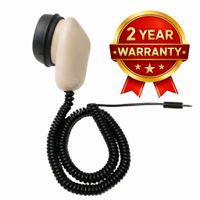
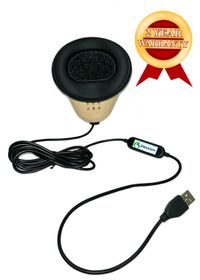
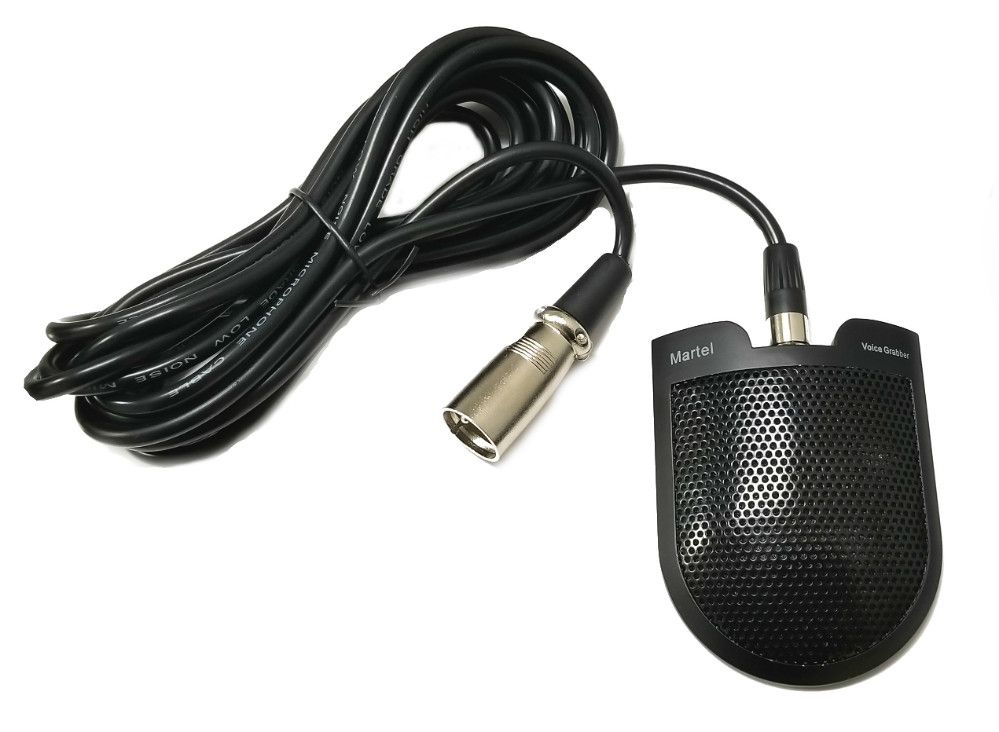
XLR Voice Grabber microphone shown on the Martel PMD3 product listing
XLR Voice Grabber microphone shown on the Martel PMD3 product listing. This photo shows the room microphone listed with the PMD3 package.

Compare the large-input and compact-recorder paths

The two Marantz names represent different starting points. The PMD661 MKIII's published specifications describe a two-channel recorder with XLR microphone inputs and phantom power, as well as a smaller line input. The PMD620 MKII's specifications describe a compact handheld with built-in microphones and external mic and line input options. Confirm the suffix on your actual device. The documents describe particular versions, and their accessory and menu details should stay tied to those versions.

If your previous arrangement relied onMartel package to compareWhat to demonstrate before using it
External XLR room microphone and a planned mask or other second sourcePMD3 Sony-based package, SKU 2028Both sources connected through supported inputs, required microphone power, the assigned left and right recordings, and playback in the intended player.
A small recorder with built-in microphones and a straightforward file transferS1 court reporter package, SKU 1542Usable speech from the intended placement, the selected memory and mode, headphone monitoring, and an actual file opened at the review desk.
Direct pedal playback from a supported Marantz recorderCheck the existing recorder and pedal first. Then compare the pedal arrangement supplied with SKU 2028 or computer playback for S1.Actual play and navigation commands, the proper connection, and review of a new test file. The S1 listing identifies no direct remote pedal jack.

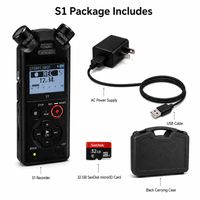
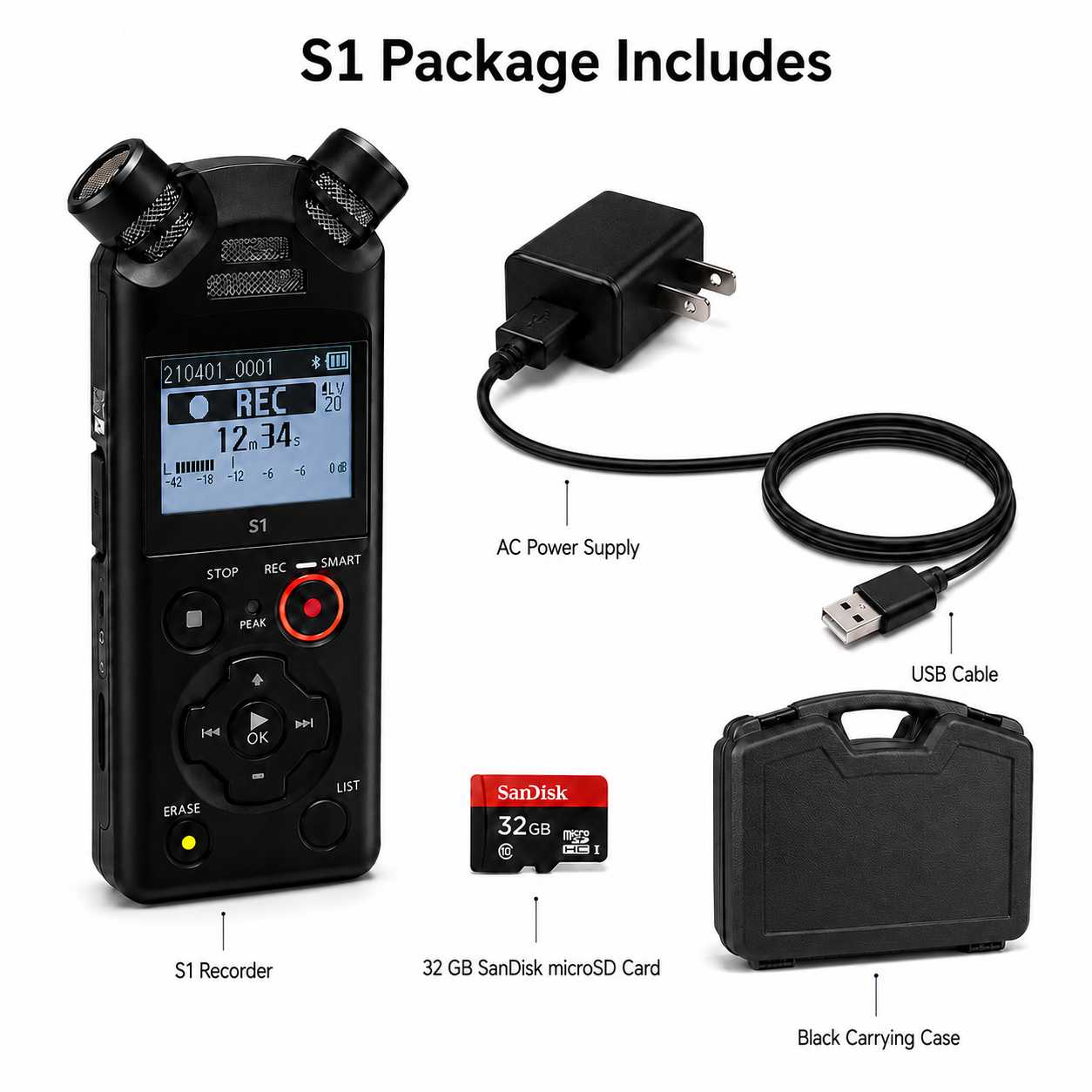
The PMD3 listing includes an XLR Voice Grabber microphone, a 32 GB SD card, card reader, power adapter and a listed pedal arrangement. The S1 kit includes its own storage and power accessories, including a 32 GB microSD card. Ask for the current packing list and confirm the precise review path with the supplier. Recorder family names and capacity labels cannot tell you whether the supplied pedal uses your preferred player or whether an older card is approved for the new device.

Use the comparison to choose a starting point. Someone who records one room signal may get what they need from a small device and thoughtful placement. Someone who needs a dedicated XLR microphone with a specified supply must resolve that requirement at the input. If two independently usable paths are required, add a playback demonstration with both sources rather than treating a stereo label as the answer.

Marantz PMD620MKII Replacement S1
Marantz PMD620MKII Replacement S1. Product image from Martel’s store; see the listing for current package contents.

Write an input inventory before buying adapters

Record the source, its model, the plug at the source end, the plug at the recorder end and the setting actually used. Include the signal type. A room microphone and a mixer feed can arrive on cables that look similar while delivering signals at different levels. A small analog mask connection may also have a wiring or power requirement different from a balanced XLR condenser microphone.

For a witness-room setup, name the positions and put the input assignment beside them. If the Voice Grabber sits near the witnesses, identify the correct XLR path and the required phantom-power setting. If a mask is the second source, confirm the supported mask connection for that exact recorder configuration. Ask whether the necessary inputs can be used together in the proposed mode. A recorder can have several sockets yet provide only a particular combination at one time.

Check connector fit and routing separately. A quarter-inch plug, an XLR plug and a 3.5 mm plug describe connection shapes. An adapter that changes the shape may leave the signal level, wiring and microphone supply exactly as before. Ask the seller to describe the path from each source to the saved file. You should be able to name the required cable, the receiving input, the setting and where you will hear the result.

The S1 listing identifies a small external mic or line input and built-in microphones. If a proposed arrangement needs a balanced XLR condenser supplied by phantom power, plan a supported external interface or choose a recorder that provides the needed input and power. Keep the source's requirement with the order so that a cable choice is made for that specific equipment.

If a venue offers a mixer feed, ask the person providing it to identify the available output and its intended level. Make a short, authorized recording of ordinary speech before using it on an assignment. A signal that is audible in headphones can still overload a receiving input. Play the sample from the saved recording and check whether loud speech remains clear.

Rebuild and verify a two-source channel map

Start the check with one source at a time. For a practice file, say “room microphone check” from the position where that microphone is intended to pick up speech. Then speak a different phrase into the voice mask using the normal arrangement. Make a short sample with both connected according to the manufacturer's instructions. Repeat ordinary speech at both positions after checking the individual sources.

During playback, listen to each saved channel with a compatible player. If the room signal is supposed to be on the left, record what actually appears there. A stereo file can contain two sources, two microphones hearing the same room, or a copy of a combined signal depending on how the device was set up. A waveform in both channels cannot identify the source without a test that distinguishes them.

Check the result after file transfer as well. Someone might open a stereo recording in a mode that plays both sides together. A review copy might be exported as mono. In either case, the operator may hear speech while losing the ability to choose a source independently. If that choice matters to the assignment, demonstrate it in the actual review software before accepting the setup.

Write a brief note that travels with the practice sample. It can contain the recorder model, the input and power settings, which source appears on which side, the file mode and the review program. Use the input and channel names shown on the device. A later user can repeat the exercise after changing a cable, relocating the equipment or updating the player.

A two-source arrangement serves the workflow it has been tested for. A proceeding requiring separately selectable feeds from four positions calls for a different channel plan. Document the requirement first. That can keep a buyer from choosing a two-channel replacement for an assignment where two sources are only part of the need.

Evaluate an S1 placement in the actual room

A small recorder is often useful because it can sit where it needs to hear the room. Start by asking which people need to be audible and where they normally sit. Notice what else happens near the recorder: pages move, laptops run, people set down drinks and the table can carry vibrations. Position the unit according to the permitted room arrangement and try several representative speaking positions.

Begin a test at a normal conversational level. Add a quieter passage, one spoken from the farthest expected seat, and one during typical document handling. Keep enough context in the sample to tell the speakers apart during review. Listen through headphones at the recorder and then open the saved file. Record the placement and the expected room size beside the practice sample so a future comparison has a known starting point.

If one seat is hard to hear, adjust the placement within the supported setup and repeat that passage. Changes in placement can alter speech clarity and nearby noise more than a mode label suggests. Consider a supported external source when the small recorder cannot be positioned suitably. Ask for an example of how to connect and verify that source before the first live job.

Playback features can make a difficult passage easier to examine. The S1 listing describes noise reduction during playback, voice balancing and speed control. Test how those tools affect listening to a saved sample. Keep the source file available under the applicable office procedure. A listening setting may change the way playback sounds without changing the original recording.

Record a final baseline for the actual use case. For a compact backup, it might be a particular table location, internal memory selected, a compatible format and a headphone check before the assignment. For travel, add a charge or battery check and a known method to copy the files. The baseline is useful because it reflects actions the reporter can repeat under time pressure.

Keep the old recordings available through the change

Make a record of the old recorder's format and the way past jobs were opened. Some users have only ordinary WAV and MP3 files. Others used a Marantz protection feature or a program that handled markers. Marantz's documentation for the PMD661 MKIII and PMD620 MKII describes encrypted recordings with extensions such as MPS and WAS when protection is enabled. Check your actual files and the authorized playback arrangement. A new device's ability to create WAV recordings says little about opening an older protected recording.

Ask the person responsible for those files to identify what must stay available after the recorder is replaced. For example, you might need an authorized way to review a recording made six months ago, reopen an old job with its existing notes, or reproduce an approved export. Test a representative practice file in each relevant old mode while the old equipment and authorized access are available. Keep credentials where your organization requires and record the responsible role in the migration notes.

Set up a cutover exercise with two folders. Put a nonconfidential copy made by the old recorder in one and a sample from the replacement in the other. Confirm that the reviewer knows how to distinguish them and can open each through the appropriate program. Include any separate channel map or note associated with the sample. Ask the reviewer to locate a known phrase near the middle and verify the end of the file.

Retain the source file and its identifiers in the approved location. If you need a delivery copy in another format, make it using a supported process and give it a clear label. Verify the parts that matter: content, duration, channels and any job information kept separately. Follow the relevant authorization process before moving or deleting originals. A successful new recording establishes the new capture path. It gives no evidence that the old files have been transferred successfully.

For legacy specifications, consult the manufacturer's PMD661 MKIII product information and PMD620 MKII product information. Keep the version differences in mind when comparing earlier models. Confirm the current Martel package from the listing and the supplier's written answer for your setup.

Martel Electronics | 3 hours ago

Marantz PMD661 and PMD620 Replacements for Court Reporters

Use your existing recorder setup to decide which connections, recording functions and review controls a replacement has to support.

First paragraph

Use this space to develop your idea and move the story forward. Add details, examples, or observations that make your point clearer. Keep each paragraph focused around one idea. Add more sections to build your story step by step.

Martel Electronics

More Posts

How Quiet Is a Stenomask? Sound Leakage and Fit EvaluationHow Quiet Is a Stenomask? Sound Leakage and Fit Evaluation
How Quiet Is a Stenomask? Sound Leakage and Fit Evaluation

An original guide to checking what listeners and outside microphones hear. Includes room planning, fit observations, measurement limits, and practical worksheets without invented sound-reduction claims.

Stenomask Accuracy: How to Measure Speech Recognition ResultsStenomask Accuracy: How to Measure Speech Recognition Results
Stenomask Accuracy: How to Measure Speech Recognition Results

Learn how to separate microphone capture, speech-recognition errors, and correction work. Includes an original evaluation process, practice text, and worksheets for comparing complete stenomask setups.

Zoom Foot Pedal: Hands-Free Mute and Unmute for Court ReportersZoom Foot Pedal: Hands-Free Mute and Unmute for Court Reporters
Zoom Foot Pedal: Hands-Free Mute and Unmute for Court Reporters

Connect the pedal to the Windows computer running Zoom and rehearse a complete mute, unmute and recording check before your next remote deposition.

Phantom Power for Courtroom Microphones: A Practical 48V Setup GuidePhantom Power for Courtroom Microphones: A Practical 48V Setup Guide
Phantom Power for Courtroom Microphones: A Practical 48V Setup Guide

Identify which device powers each microphone, confirm the supported connection, and verify the complete recording path before work.

Microphone Splitter vs. Mixer: Plan the Right Court-Reporting Audio PathMicrophone Splitter vs. Mixer: Plan the Right Court-Reporting Audio Path
Microphone Splitter vs. Mixer: Plan the Right Court-Reporting Audio Path

Identify the sources, destinations and channel separation you need before choosing a splitter, mixer or USB interface.

Stenomask USB Sound Cards: Andrea USB-SA vs. Sound Blaster PLAY! 3Stenomask USB Sound Cards: Andrea USB-SA vs. Sound Blaster PLAY! 3
Stenomask USB Sound Cards: Andrea USB-SA vs. Sound Blaster PLAY! 3

Match the adapter to the mask, computer and application, then verify the complete microphone path with a saved recording.

DM4 vs. DM246: Choosing a Four-Channel Courtroom Recording SystemDM4 vs. DM246: Choosing a Four-Channel Courtroom Recording System
DM4 vs. DM246: Choosing a Four-Channel Courtroom Recording System

Choose the recording workflow that fits your team, then compare complete microphone packages and verify the saved files through transcription review.

Digital Court Reporting Equipment: A Complete Recording and Transcription SetupDigital Court Reporting Equipment: A Complete Recording and Transcription Setup
Digital Court Reporting Equipment: A Complete Recording and Transcription Setup

Build a complete recording-to-transcription workflow. Compare equipment roles, map the room, and verify the saved result before accepting a system.

Martel Video Transcriber Kit or Software Only: Choose the Right SetupMartel Video Transcriber Kit or Software Only: Choose the Right Setup
Martel Video Transcriber Kit or Software Only: Choose the Right Setup

Compare Martel SKU 1515 with pedal and headset against SKU 1527 software with two licenses. Choose the setup that matches the equipment you already own.