DM4 vs. DM246: Choosing a Four-Channel Courtroom Recording System
By Martel Electronics · November 11, 2026
Choose the recording workflow that fits your team, then compare complete microphone packages and verify the saved files through transcription review.
DM4 versus DM246: where the recording happens
The central difference between the Martel DM4 and DM246 is where the recording work happens. The DM4 arrangement uses a compatible Windows computer with recording software and a USB audio interface. The DM246 arrangement records to removable media in a standalone recorder. Both can form part of a four-channel courtroom recording workflow, but they place different responsibilities on the operator, computer and supporting equipment.
This distinction matters more than the appearance of the carrying case. A buyer who already operates an approved recording computer may prefer a system that brings input controls and software together at that workstation. A buyer who needs to record without running a computer at the table may prefer a standalone recorder. Either buyer still needs microphone placement, monitoring, file management, backup arrangements and a way to review the resulting channels.
Four channels are useful because they can keep microphone feeds separate for later listening. They do not guarantee that each person appears on only one channel. Nearby microphones also hear the room, and seating arrangements can change. A channel may represent a witness position, a table or another recording zone rather than a permanently identified person. The operator must verify the channel map and the reviewer must understand it.
This guide compares the operating decisions behind the two systems. Product descriptions and package contents can change, so use the linked listings and a written quote to confirm the exact configuration you will receive. Examples here describe planning and acceptance exercises; they are not claims that Martel measured a particular room or certified a particular proceeding. The goal is to choose a system whose complete workflow you can explain, test and repeat.
Start with one sentence: “During recording, our primary audio file will be written by this device, to this destination, while this person checks it.” If your team cannot finish that sentence confidently, resolve the workflow before comparing accessories. It identifies the operational choice that separates these systems and gives every later purchase a clear purpose.
Compare the complete signal paths
Decision
DM4 computer-based arrangement
DM246 standalone arrangement
Primary recording device
A compatible Windows computer running the recording software
The standalone recorder
Microphone entry point
The supplied multichannel USB interface in the selected package
The recorder's microphone inputs
Destination to verify
The software's selected recording folder and storage device
The recorder's selected supported media and recording settings
Computer during recording
Required for the DM4 recording workflow
Not required to operate the standalone recording path
Later review
Confirm the saved files and the intended multichannel playback workflow
Transfer the recorded files and confirm the intended multichannel playback workflow
Read the table from left to right as a set of responsibilities, rather than as a scorecard. Removing the computer from live recording removes one group of dependencies from that stage. It does not eliminate all computer work: transferring, reviewing, transcribing and delivering files may still involve a computer. Conversely, using a computer for recording can put controls, file naming and other approved tasks together, but that convenience also makes the computer part of the recording system that must be prepared.
Draw the path for your actual quote. Include every microphone, cable, interface, recording destination and monitoring connection. Then draw the review path separately. A supplier may offer software alone, hardware with software, or a more complete microphone package under related names. A product family name is not an inventory of the box. Mark anything that your organization will supply, including the computer, storage, power arrangements and review workstation.
Finally, identify the boundaries between components. A live meter in recording software confirms activity at that point in the path. It does not by itself establish that the intended file was saved correctly. A headphone connection can monitor different points depending on the device and settings. Ask what that connection actually proves and include saved-file playback in acceptance. These distinctions are useful for either system and prevent a purchasing discussion from stopping at “we can hear the microphones.”
What the DM4 package asks of your computer
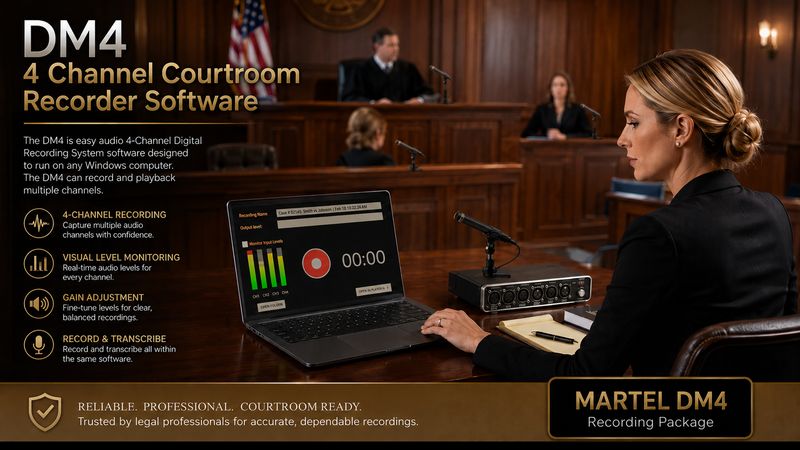
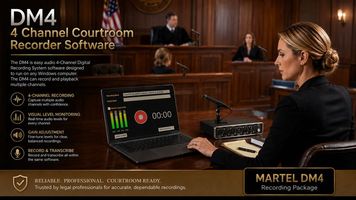
4 Channel Courtroom Recorder Software hardware - DM4 with 4 Microphones package. Martel’s DM4 product illustration. The computer shown is not included with the recording package.
Martel's listed DM4 four-microphone package combines recording software, a four-channel USB interface, professional courtroom microphones, cables, stands, monitoring headphones and a carrying case. A compatible Windows computer is not included in that package. The computer is therefore an explicit purchasing and preparation item, even when an organization already owns a machine it hopes to use.
Confirm the supported Windows version and the current software requirements for the exact DM4 version supplied. Then compare those requirements with the actual computer, rather than with a general description such as “new laptop.” Check available connections, storage, power supply and the other approved applications that will run during the assignment. A computer that performs an office task satisfactorily has not yet demonstrated that the complete recording arrangement works.
Choose the recording destination deliberately. The operator should know which local folder receives the files, how much space remains and how to find a completed recording without searching recent documents. Organization-managed backup or synchronization can be valuable, but its behavior during active recording must be understood. Do not assume that a cloud icon means an open recording has already become a verified independent copy.
The USB connection is part of the signal path. Decide where the interface connects, whether an adapter or hub is necessary, and how cables will be protected from accidental movement. Test the arrangement you intend to deploy, including the computer's power connection and any required accessories. Replacing a direct connection with an untested hub on the morning of an assignment changes the system you previously accepted.
Computer preparation also includes operational ownership. Identify who can install authorized updates, resolve permissions, configure approved recording settings and recover the working arrangement after a repair. Keep a record of the tested configuration without exposing passwords or confidential material. If the designated operator cannot change a setting on a managed computer, arrange that support before the equipment arrives. DM4 is a sensible candidate when these computer responsibilities fit comfortably into the organization's normal work.
What standalone recording changes with the DM246
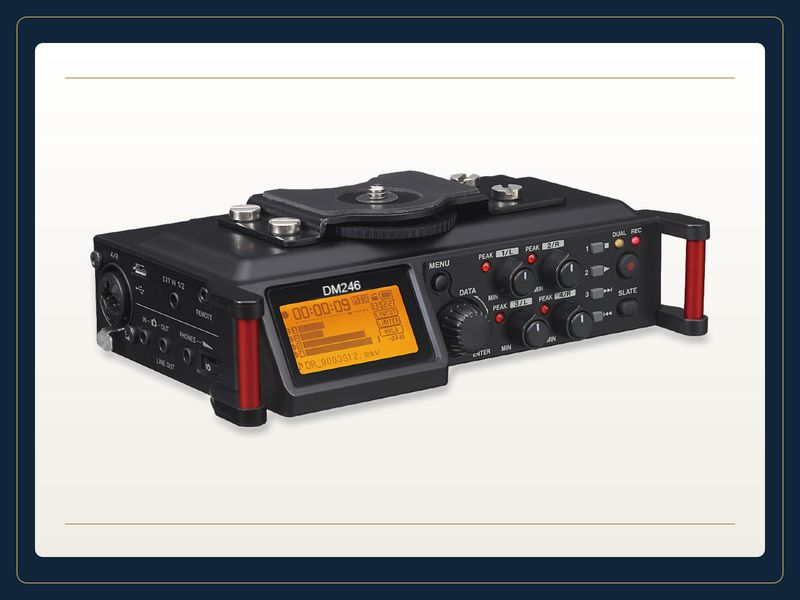
Martel DM246 V2 Four Channel Courtroom Recorder - System. Product image from Martel’s store; see the listing for current package contents.
The DM246 moves live recording into a dedicated recorder. Martel describes it as a four-channel system with microphone inputs, phantom-power capability, recording to cards, and AC and battery operation. The exact package can differ by microphone selection and quantity. Confirm the quoted combination and the supported recording settings before treating a photograph as a complete list of supplied equipment.
A standalone recorder can simplify a portable assignment because the operator does not need a computer running the recording application at the table. It also gives the recorder's controls, display, media and power arrangements more importance. Practice identifying the active file, confirming that recording has started, checking each required channel and recognizing the remaining recording capacity. The useful question is whether the assigned operator can perform those checks consistently in the actual working position.
Removable media creates a clear transfer step. Decide who removes or connects the media, where the first copy goes, who checks the copy and when the media may be reused. Do not turn “the files are on the card” into an indefinite storage plan. The card is part of the recording workflow, and its custody and reuse need to fit your organization's requirements.
AC and battery options provide operating choices, but a buyer should verify how the delivered recorder behaves with the selected power configuration. Do not infer uninterrupted operation during every power event from the presence of both options. Ask for the relevant operating instructions and rehearse any permitted changeover procedure with disposable test audio. Record the configuration that was tested rather than assuming another battery type or power accessory will behave identically.
Physical controls deserve an ergonomic check too. Can the operator see the display without leaning across microphone cables? Can headphones be connected without stressing a socket? Is the recorder protected from papers, drinks and accidental button presses? A small dedicated device still needs a stable operating location. The DM246 is a strong candidate when independent live recording and a deliberate later transfer stage match the team's preferred routine.
Match the microphones before comparing recorder prices
Comparing a DM4 package with a DM246 package is meaningful only when the microphone arrangements serve the same task. Four supplied microphones, eight supplied microphones, directional pickup and omnidirectional pickup are different purchasing details. The number of microphones is also different from the number of separately recorded channels. Ask how each included microphone connects and where its signal appears in the saved result.
Start with a drawing of the occupied positions. Mark the operator, principal speaking locations, witness position, any standing presenter and any remote participant feed that must be captured through an approved connection. Note where papers, screens and table edges affect placement. A room plan tells Martel more than a label such as “small courtroom,” because two similarly sized rooms can have very different speaking arrangements.
A directional microphone can help emphasize sound from a chosen direction, but orientation and distance still matter. An omnidirectional microphone offers a different coverage pattern and still captures the surrounding acoustic environment. Neither description is a promise that distant speech will remain clear through room noise or overlapping conversation. Test the proposed microphone type in the positions it is intended to serve.
For each quoted package, ask for a microphone-to-channel map. If multiple microphones share an input through the supplied arrangement, identify which voices will be combined before recording. Once sources have been mixed together, later playback cannot restore the original separate electrical feeds. A four-channel recorder does not automatically create four isolated people, and adding microphones does not automatically create more recording tracks.
Compare cable lengths, stands, required power and packing arrangements as part of the same exercise. A package that contains suitable microphones but cannot reach the assigned positions is incomplete for that room. Allow for safe routing and strain relief without stretching a cable across a walkway. The better comparison is the cost and practicality of two complete, tested room arrangements, not the price of two boxes with different microphone contents.
Build a channel map the reviewer can use
A channel map connects the physical room to the saved recording. Give every input a stable label and record what it was intended to capture. Labels such as “Channel 1 — witness position” or “Channel 2 — left counsel table” are often more useful than a person's name alone, because occupants can change during a session. Follow your organization's naming conventions and record any changes in the session notes.
Make a short test recording before the real assignment. Speak from one required position at a time and identify the location aloud using nonconfidential test language. Save the recording and listen to each channel in the review application. This verifies the route from the microphone position to the file and then to the review controls. Merely tapping a microphone and watching a live meter leaves part of that path unchecked.
The map should describe what is actually present, including any shared feed. If channel four receives a combined remote source, write that clearly. If two microphones feed one channel through an approved package arrangement, list both positions. Do not label that channel as though it were a single isolated speaker. Reviewers make better decisions when they know the limits of the recording structure.
Record changes as changes. Moving a microphone from a fixed table to a standing presenter halfway through an assignment alters the meaning of its channel. Note the relevant recording position or session segment and the new placement. A channel label that remains unchanged in the software can otherwise mislead someone listening days later. The point is to preserve a reliable explanation, not to create an elaborate second transcript.
Use the same channel map to compare DM4 and DM246 demonstrations. Ask both arrangements to capture the same positions and then review the saved results through the intended software. This makes the comparison concrete: can the reviewer find the required feed, hear the relevant words and understand any shared audio? The method avoids treating a larger meter display or a different control layout as evidence of better recorded separation.
Separate live listening from saved-file verification
Monitoring is a chain of checks rather than one headphone socket. The operator may listen to incoming sound, inspect channel meters, confirm that recording is running and play back a saved test. Each check answers a different question. Describe those questions explicitly when comparing the DM4 interface, recording software and DM246 controls.
Live listening helps identify problems such as a disconnected microphone, intrusive handling noise or a poor speaking position. Input meters help show activity and warn of excessive level at the displayed stage. A recording indicator helps establish the device's current operating state. Saved-file playback checks the result produced by the recording process. None of these observations should be casually substituted for all the others.
Ask the supplier to identify the monitoring path for the exact configuration. Is the operator hearing a direct input route, software playback, a return path or some selectable combination? What can be heard while recording, and what requires a separate playback step? Do not assume that two headphone sockets provide the same assurance merely because both sound clear during a demonstration.
Use a repeatable acceptance sample containing normal speech, a quieter speaker, a short overlap and a brief pause. Keep the content nonconfidential. Listen for intelligibility, unexpected silence, distortion and the way room sounds affect each channel. Change one setting or microphone position at a time so the result can be understood. Record the final accepted arrangement in the equipment notes.
During real work, follow the applicable monitoring and interruption procedures. This article is an equipment comparison, not permission to interrupt or alter an official process. The buying decision should include a practical explanation of how the designated operator will recognize a problem and act within those procedures. The most useful monitoring arrangement is one the operator can understand and maintain throughout the assignment.
Plan storage from the recorded format and duration
Storage planning begins with the selected recording format, number of channels and expected duration. A card capacity or computer drive size alone does not tell you how long the required configuration will record. Confirm the supported settings for the exact product and use the device's available-space information together with a representative test.
For an illustrative uncompressed calculation, four channels recorded at 44,100 samples per second and 16 bits per sample produce 352,800 bytes per second of audio payload. That is approximately 1.27 decimal gigabytes per hour before file headers and other overhead. This is arithmetic for that specified format, not a measured runtime or a capacity promise for every DM4 or DM246 setting. Different formats and channel counts change the result.
Leave working space beyond the estimated recording itself. You may need temporary copies, a review copy, exports or an additional session. A nominally large drive can already contain unrelated material. A card can contain earlier files that have not been cleared under the approved reuse process. Check available space at the recording destination, not just the capacity printed on the package.
For DM4, include the computer's recording folder and any approved backup destination in the plan. For DM246, include supported media, the transfer method and the destination that receives the recording after the assignment. Avoid assuming that a spare card or a second folder automatically provides an independent backup of the current session. Identify what is copied, when it is copied and how the copy is checked.
Ask how the system handles long sessions and any file-size or duration boundaries relevant to the selected settings. Review a test that crosses an applicable boundary when practical, and confirm that the review application presents all segments in the correct order. A clear segment list is more valuable than discovering later that a long recording was divided in a way the reviewer did not expect.
Compare power, packing and setup time
Portability includes every item that must arrive, connect and work. For DM4, count the computer, its power supply, the interface, microphones, cables, headphones and any approved adapters. For DM246, count the recorder, its required power accessories, supported media, microphones, cables and headphones. Include the equipment needed for your backup plan separately. A carrying case helps organize a system, but it does not establish that every required component is inside.
Make a packing list that matches the accepted configuration. Use model identifiers or clear labels where similar-looking parts could be confused. A generic USB cable, power adapter or microphone cable may have the wrong connector or unsuitable characteristics. Keep the instructions for required power arrangements with the kit and avoid substituting an unverified supply because its plug happens to fit.
Time a complete setup rehearsal. Begin with the equipment packed, then place microphones, route cables, connect power, start the recording path, make a test file and review it. Include the time to correct an ordinary mistake, such as a disconnected microphone. The result is a planning observation for your team, not a universal speed claim about either system. Record which steps require the most care.
Consider the working surface. DM4 needs room for a computer and interface where controls remain visible. DM246 concentrates recording controls on the recorder, but still needs accessible inputs and a protected display. Both need cable paths that do not pull equipment toward an edge or place connections under strain. A configuration that works on a large demonstration table may need changes in a crowded assignment space.
At pack-down, reconcile the physical equipment and the recorded material separately. Confirm that required files have reached the approved next stage before resetting settings or reusing media. Then check the equipment list and note damage or missing items while the session is still fresh. This routine makes portable work more predictable and provides a fairer comparison than the weight of the recorder alone.
Compare the handoff to T147 and the reviewer
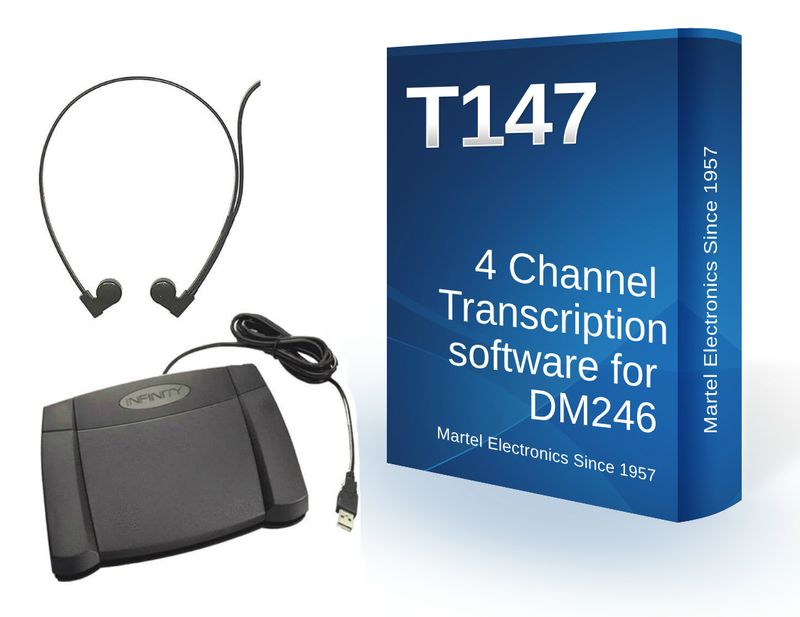
T147 4-Channel Transcription Kit for DM246 Courtroom Recorder. Product image from Martel’s store; see the listing for current package contents.
A recording system should be evaluated through the review stage. Martel's T147 product family is relevant when the reviewer needs to listen to multichannel courtroom recordings. The listed T147 kit includes review equipment, while the software-only listing serves a different purchasing need. Confirm the exact software version, supported files, computer requirements and supplied accessories for your proposed workflow.
Ask for a sample produced by the recording configuration you are considering. Open it on the intended review computer, confirm the channels and test the controls the reviewer will actually use. A general statement that software “supports audio” does not demonstrate the required multichannel behavior. The reviewer should be able to identify the file, choose the relevant channel or combination, pause, rewind and resume without losing the meaning of the session sequence.
For a DM246 workflow, include transfer from the recorder's media in that demonstration. For a DM4 workflow, include locating and copying the software's saved result. In both cases, check the actual delivered files rather than a convenient demonstration file from another configuration. Ask whether all necessary associated files or segments must travel together and record that instruction in the handoff procedure.
Describe the transcript task clearly. Playback software, foot-pedal control and channel selection help a person review audio. They are not the same thing as a guaranteed automatic transcript, verified speaker identification or a completed official record. If an organization uses automated text assistance, its accuracy review and authorization belong in a separate, explicit process. Do not let a broad product phrase blur those responsibilities.
Have the recording operator and reviewer perform the handoff together during acceptance. The operator supplies the files, channel map and segment notes. The reviewer opens the material and confirms what can be heard. Any missing step becomes visible while the team can still change the setup. This is often where a seemingly small purchasing omission, such as an absent playback license or incompatible pedal, becomes important.
Specify what your backup actually protects
The word “backup” can describe several different things: spare hardware, a copy of a completed file, a second recording made during the assignment or a recovery procedure. These are useful in different ways. State which one you mean when comparing DM4 and DM246 proposals so that a spare cable is not accidentally treated as a second recording and a second folder is not treated as independent protection.
A completed-file copy helps protect against losing access to the original storage after that copy exists. It does not recreate audio that was never captured. A second recording path may protect against some failures in the primary recording arrangement, but it can still share vulnerabilities if it depends on the same microphones, mixer, power source or operator action. Describe shared components honestly.
For example, a hypothetical organization might plan a primary multichannel recording plus an independently operated supplementary recorder under its approved procedures. That example does not establish that any particular connection, microphone split or backup device is compatible. The engineering and policy details must be confirmed for the actual setup. Do not connect recorder outputs or microphone inputs together simply because a cable is available.
Write a short failure scenario for each proposed arrangement. What happens if the recording computer becomes unavailable? What happens if media is full, a microphone cable disconnects or the wrong input is selected? Identify the check that should reveal the problem and the authorized response. A useful plan explains both recognition and recovery without promising that every event can be prevented.
Then rehearse the permitted recovery steps using test material. Check that the operator can find the spare item, recognize the saved files and explain any gap or segment change. Keep test results separate from the official record. The backup comparison should end with a concrete statement of what is protected, what remains shared and who is responsible for checking it. That statement is more valuable than an undefined claim of redundancy.
Example: comparing both systems for a fixed room
Consider a hypothetical fixed room with four planned recording zones, a designated operator and a review workstation elsewhere in the building. The organization has an approved Windows computer available, but it has not yet tested the recording software or interface. This situation gives DM4 an obvious practical advantage to investigate: some required computer infrastructure already exists. It does not establish compatibility by itself.
The DM4 evaluation begins by checking that computer's supported operating environment, connections and recording destination. The team installs the authorized configuration, maps microphones to channels and creates a saved test. The reviewer then opens the resulting files and checks channel selection. The organization records the accepted settings and identifies who supports the computer after routine maintenance.
The DM246 evaluation uses the same microphone positions and acceptance content. The operator learns the recorder's controls, checks media and power, makes the recording and follows the planned transfer procedure. The reviewer performs the same listening tasks. The comparison now addresses real operational differences: which controls the operator finds practical, how files arrive at review, and how easily the team can explain the accepted setup.
The team should also compare the complete quotes. Existing computer ownership may reduce one purchase, while additional preparation or support still has a cost. A standalone arrangement may simplify live operation while adding a distinct media-transfer task. These are questions for that organization; they are not universal claims that one system always costs less or takes less staff time.
A sensible decision records why the chosen arrangement fits this room. For example, the team may favor its tested computer workflow because staff already manage that workstation, or favor standalone recording because it wants live recording separated from the computer's other duties. The decision should cite observed acceptance results and assigned responsibilities. Revisit it if the room, computer policy or staffing arrangement changes materially.
Example: comparing both systems for changing locations
Now consider a hypothetical operator who travels to changing rooms and sometimes has a narrow table with limited power access. The operator needs four planned recording feeds and later review at an office workstation. Here, the equipment list, operating surface and repeatable setup routine deserve particular attention. Room variability can matter more than a feature that looks attractive in a fixed demonstration.
For DM4, the rehearsal includes bringing the correct computer and power supply, connecting the interface through the tested arrangement and confirming the recording folder. The operator checks that every microphone reaches its assigned position without unsafe routing. The test ends by saving and reopening the result, rather than stopping when the software shows moving meters.
For DM246, the rehearsal includes supported media, the approved power configuration and a clear method for identifying the session files. The operator practices viewing controls and levels from the available position. After recording, the operator follows the intended transfer and copy procedure. If the reviewer uses a different computer, the rehearsal includes that handoff too.
Compare what changes when the room changes. Microphone positions and cable routing may need adjustment for either system. A standing presenter or remote feed may require a different approved connection. Keep a baseline packing list and record only the assignment-specific changes. This makes it easier to notice when an essential accessory has been omitted or a previously tested configuration has been altered.
The decision may favor standalone recording if operating without a live recording computer is the stronger practical fit. It may favor DM4 if the operator already works comfortably from a properly prepared computer and values that recording environment. Neither conclusion follows solely from the word “portable.” Choose the arrangement that the assigned person can set up, monitor, transfer and explain reliably under the conditions they actually encounter.
Build an itemized comparison instead of comparing headlines
Request itemized quotes for the two complete arrangements. Use the same room drawing, recording requirements and review needs for both. That gives the supplier a consistent problem to solve and makes differences in package scope visible. A low headline price can describe software alone, while a higher price can include microphones, playback equipment or accessories that the first proposal leaves to the buyer.
Quote line
Question to resolve
Recording hardware and software
Which exact models, versions and licenses are included?
Computer
Is it included, already owned and verified, or a separate purchase?
Microphones and connections
Which types, quantities, cable lengths and channel assignments are supplied?
Power and media
What is included, what is supported, and what must the organization provide?
Review workstation
Are playback software, compatible foot control and headphones included or separate?
Support and training
Who helps with installation, operation and problems in the complete arrangement?
Separate one-time purchases from ongoing responsibilities without inventing a recurring fee. Ask what the quoted software license includes, whether any optional service is being proposed and how future updates are handled. A product name alone does not establish a subscription obligation or a lifetime entitlement. Obtain the actual terms relevant to the quote.
Document exclusions in the same comparison. DM4's listed microphone package does not include the Windows computer. Other configurations may omit microphones or review accessories. Confirm what is already owned and demonstrably compatible before removing an item from the quote. Reusing an unsuitable accessory can make a nominal saving disappear during installation.
Finally, include acceptance work in the purchase discussion. Ask who will demonstrate the recording-to-review path and how unresolved compatibility questions will be handled before deployment. A complete written scope allows the team to judge value and readiness together. Keep the dated quote with the final configuration record so a later replacement order does not rely on memory or an outdated product photograph.
Use a recording-to-review acceptance checklist
Acceptance should follow the audio through the proposed system. Use a disposable test session and the same equipment, settings and people who will operate the final arrangement where practical. Record the date, relevant versions and any unresolved issue. The checklist below is a planning tool, not a certification or a substitute for your organization's required procedures.
Match delivered items to the quote, including microphones, cables, power accessories, software and review equipment.
Confirm the supported computer environment for every stage that uses a computer, including standalone recording's later review stage.
Place the microphones at the required positions and label the actual input-to-channel map.
Confirm the selected recording settings, destination, available capacity and power arrangement.
Record normal speech, quieter speech and a short overlap from the planned positions.
Check the saved result and each required channel, then transfer it through the intended handoff.
Open the delivered files on the review workstation and test playback controls, channel selection and any required pedal.
Reconcile segments and copies, document limitations and assign responsibility for remaining work.
Define success in terms of the required work. “The reviewer could locate the witness-position channel and understand the test passage” is an observable result. “The system sounded professional” is too vague to guide a later troubleshooting call. If a test fails, record the symptom, change one relevant factor and repeat the affected check. Keep untested assumptions visible until they are resolved.
After acceptance, produce a short operating sheet. Include the device names, recording destination, channel map, preflight checks and handoff responsibility. Store detailed manuals separately so the quick sheet remains usable. Retest relevant parts of the workflow when a major component, software version, room layout or required output changes. Acceptance describes a configuration at a point in time; it is not a permanent promise about every future variation.
DM4 and DM246 buying questions
Does DM4 include the recording computer?
The listed DM4 four-microphone package does not include a computer. Plan a compatible Windows computer separately and confirm the current requirements for the supplied software. If you request a custom quote that includes a computer, have that inclusion stated explicitly rather than inferring it from a product illustration.
Does standalone mean no computer is ever needed?
No. DM246's standalone recording path can operate without a computer running the live recording application. Transferring, reviewing, transcribing or delivering the files may still use a computer. Evaluate those later steps before deciding what equipment the complete workflow requires.
Will four channels separate every speaker automatically?
No. Channels preserve the feeds routed to them. Microphones can hear more than one person, several microphones can share a feed, and occupants can change positions. Use a documented channel map and verify the saved recording. Separate channels provide review options; they do not replace careful placement or accurate speaker notes.
Can existing microphones be reused?
Possibly, but confirm connector type, signal level, power requirements and compatibility with the exact input. Include the microphones and cables in the acceptance test. Do not assume an adapter makes an electrical connection suitable or that every microphone with a familiar connector requires the same power.
Which system is the better purchase?
Choose DM4 when a verified computer-based recording workflow fits your team. Consider DM246 when dedicated standalone live recording better fits your operation. Compare complete packages using the same room, channel, power, transfer and review requirements. The better purchase is the configuration that passes those checks and has clear ownership throughout its operating life.
More questions about choosing DM4 or DM246
What is the main operating difference between DM4 and DM246?
DM4 uses a supported computer and recording application with its interface. DM246 records through the standalone recorder's supported arrangement. Compare the complete operating procedure, including power, monitoring and file transfer, rather than only the appearance of the main unit.
Is the software-and-mixer listing the same as a complete DM4 microphone package?
No. The current listings identify different supplied contents. Match the item and variation on the quote to the microphones, cables, stands and other accessories you need. Do not infer package contents from the DM4 name alone.
Does the DM246 base listing include every microphone shown elsewhere?
Check the exact package. A recorder listing and a microphone bundle can contain different items even when they use the same recording unit. Ask for an itemized list that identifies the microphone quantity and required cables.
Does four-channel recording mean four microphones must always be connected?
Use the arrangement supported by the device and application for the assignment. The available channel count does not itself dictate a microphone layout. Identify the required speaking positions and confirm how the chosen inputs will be saved.
Should I choose the system with the fewest separate boxes?
Consider setup time and transport, but also inspect the complete workflow. A compact recorder still needs appropriate microphones, power, media and review equipment. A computer setup may suit an operator whose required tools already depend on that workstation.
Can a recorder's screen replace a headphone check?
A screen can show operating information or levels, but it cannot tell you everything about speech clarity. Use supported monitoring and review a saved sample. Confirm both the device's recording state and the sound that reaches the review workstation.
Do both systems automatically create a finished transcript?
No such result follows from recording audio. Identify the separate transcription process, compatible playback tools and responsible reviewer. A recording package should be evaluated for capture and handoff; document preparation has its own requirements.
When should T147 enter the purchase discussion?
Discuss it when planning review of the supported four-channel recordings. Confirm the file workflow and distinguish software-only licensing from a package with controls and headphones. Test a representative file before accepting the full recording-to-transcription arrangement.
Can I judge battery needs from meeting length alone?
Include the actual powered microphone arrangement, recording mode and supported power sources. Rehearse a representative session with margin under your operating procedure. An advertised maximum is not a measurement of every possible connected configuration.
What should be included in a side-by-side demonstration?
Use the same room positions and comparable speech samples, then review the saved channels. Record the microphones and settings used with each system. Differences in placement or accessories can otherwise be mistaken for differences between the recording units.
Will either system remove overlapping speech afterward?
Separate channels can support focused listening when the signals differ, but microphones can pick up multiple people. They do not guarantee clean separation of simultaneous speech. Evaluate actual overlap samples and retain realistic expectations about the source recording.
What should I label when moving the equipment between rooms?
Label microphones, cables, input assignments and case locations in a consistent way. Keep a room-specific map where needed. Recheck the saved channel assignment after setup rather than assuming transport preserved every connection.
Should file transfer be tested before buying?
Yes. Follow the proposed transfer method through to the intended review workstation. Verify the number of files, duration, channels and playback controls. Successful recording on the capture device is only one part of acceptance.
How should a quote describe training?
Identify the functions covered, who will receive assistance and what preparation is required. Ask whether recording setup, file transfer and review software are all included. Avoid treating a general support statement as a detailed training schedule.
What changes justify repeating the acceptance exercise?
Material changes to microphones, input routing, computer software, recording mode or transfer procedure can affect the result. Repeat the relevant sample checks and update the configuration record. This keeps the accepted workflow tied to equipment actually in use.
Explore equipment for this workflow
Martel Electronics | 3 hours ago
DM4 vs. DM246: Choosing a Four-Channel Courtroom Recording System
Choose the recording workflow that fits your team, then compare complete microphone packages and verify the saved files through transcription review.
First paragraph
Use this space to develop your idea and move the story forward. Add details, examples, or observations that make your point clearer. Keep each paragraph focused around one idea. Add more sections to build your story step by step.