TIME IS RUNNING OUT FOR 2026 TAX WRITE-OFFS

Martel Electronics | 16 hours ago

Court Reporter Microphone Noise: Typing, Paper, and Cable Movement

Identify typing, page-turn, and cable noises with practical saved-recording comparisons. Includes placement examples and 30 questions and answers.

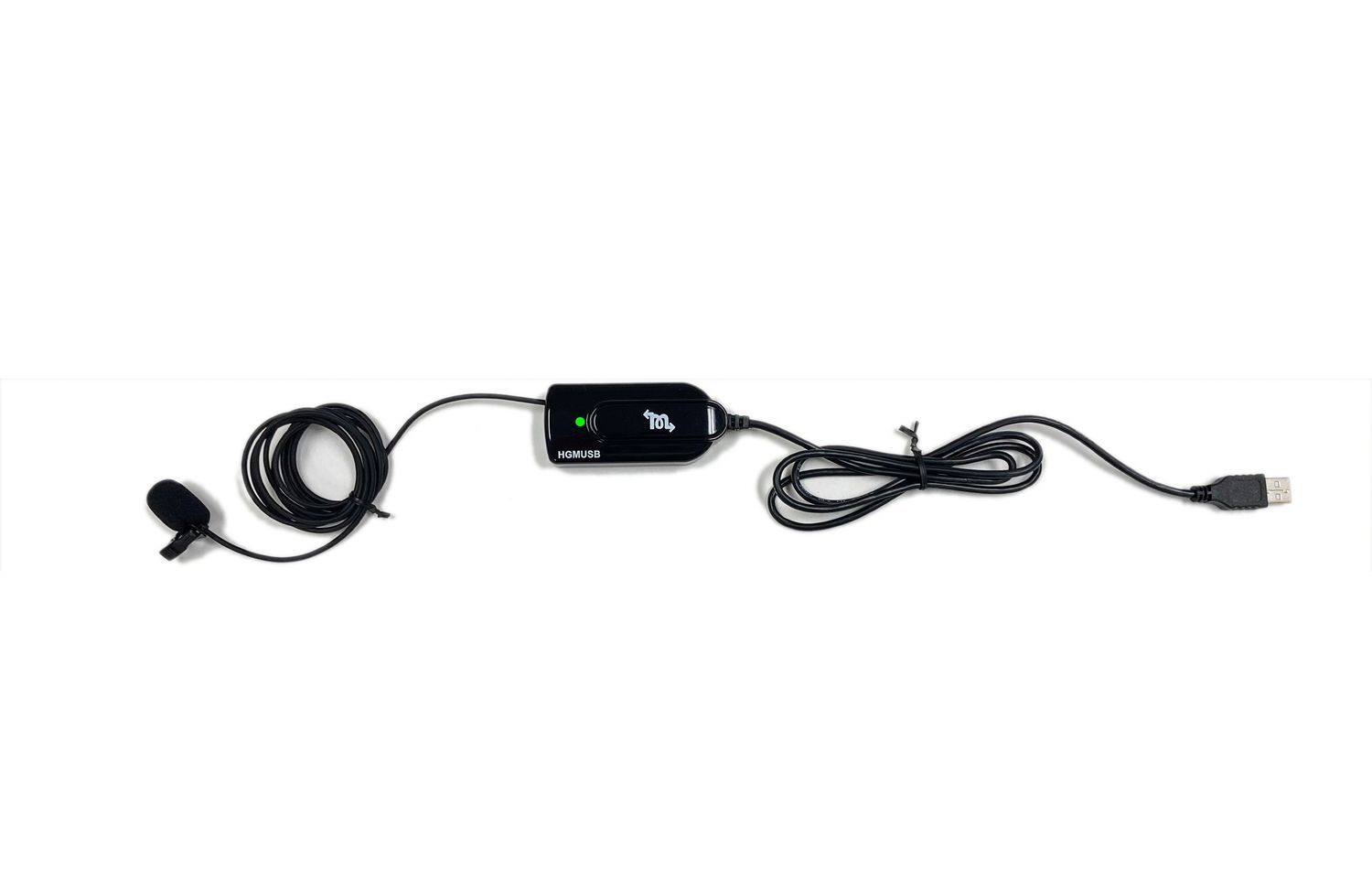
Martel HGM-USB microphone, inline module, cable, and USB plug
The HGM-USB microphone and its cable arrangement. Evaluate the supported placement in your own work area.
In this guide

A clear voice can be interrupted by a very small movement near a microphone. A folder slides across a table, a cable rubs an edge, or a typist rests a hand beside the pickup. The resulting sound may be brief, yet it can land on the exact syllable you need to review. A useful response begins by identifying the action that produced the sound and testing a practical change to the setup.

This guide gives you a method for evaluating ordinary work around a court reporter microphone. It covers keyboard activity, document handling, furniture contact, cable movement, equipment supports, and the balance between reducing noise and preserving speech. The exercises use harmless practice material. They are procedures for your own evaluation, not claims that Martel has measured a particular reduction in your room.

You can use this approach when evaluating the Martel HGM-USB microphone, the HGM-2 court reporter microphone, or another supported arrangement from the Martel court reporter microphone category. Match the microphone and receiving equipment first. Then use saved recordings to decide where the equipment belongs on a working table.

Describe the interruption before naming its cause

Start with an observation you can reproduce. "A short thump occurs when the binder closes" is more useful than "the microphone is noisy." The first description connects an action to a moment in the recording. The second could describe ventilation, electrical interference, an incorrect input, clipping, a loose connection, or several unrelated problems.

Make a short note of when the sound occurs. Does it happen while someone touches the microphone, while someone moves a cable, or while a nearby person types? Does it continue when nobody moves? Does the saved file contain it, or do you hear it only through a particular listening device? These distinctions narrow the next test without pretending to identify a component failure from one sound.

Avoid changing equipment immediately. First establish a repeatable example using an ordinary movement. Do not strike the table, pull a connection, or bend a cable sharply to make a dramatic recording. A demonstration should resemble the activity you need to accommodate. Exaggerated impacts can create irrelevant results and risk damaging equipment that was otherwise working.

Separate the sound in the room from contact with the setup

Typing and paper handling can be heard in the room. Contact with a table, support, or cable can also coincide with an unwanted sound in the recording. You do not need laboratory instruments to begin a practical comparison, but you should avoid claiming that a casual listening exercise has isolated every physical path.

Record a brief practice passage while the microphone is untouched. Repeat the passage while someone types at a normal pace nearby. Then move the typing activity farther from the pickup, keeping the microphone and speaker positions unchanged where possible. Save both versions. A useful improvement is one you can hear in the actual speech recording, not one inferred from the appearance of the table.

For a separate trial, keep the keyboard activity in place and evaluate a different supported microphone position or support. Note which element changed. If several things move together, describe the trial as a complete layout comparison. That is still useful, but it cannot tell you which individual change produced the difference. Honest notes make later decisions easier.

Build a work-surface map

Draw the tabletop from above. Mark the reporter's computer, the keyboard or writer, the main document area, each regular speaking position, and the microphone. Add the cable route and receiving device. Use simple rectangles and labels. The drawing is a working record, so clear labels matter more than scale or appearance.

Mark activity areas as well as objects. A closed binder may be quiet, while the space where pages are repeatedly turned is busy. A laptop may stay in one place while its power lead moves whenever a chair shifts. Think about what hands, papers, cups, and cables actually do during the assignment.

Look for a microphone position that serves the voices while leaving room for routine activity. Placing the microphone outside a busy document area may help, but moving it too far from a quiet speaker can introduce a different problem. Your map should make both relationships visible. Keep a photograph of the final arrangement so that another operator can reproduce the placement rather than guess from the description.

Choose a repeatable practice passage

Use a short passage that includes a few details the listener must distinguish. For example: "Taylor received the green folder on Thursday. There were sixteen pages in the first section and sixty pages in the second. The next review begins at two forty." This is an original practice passage, not a standardized measurement or a real case statement.

Record the passage once without deliberate work-surface activity. Use the same speaking position and ordinary voice for the comparison recordings. Keep the reference passage available, but listen before reading it if possible. A listener who already knows every word may unconsciously supply a syllable that was difficult to hear.

You can also add a brief pause and a short answer, such as "No, sixteen." Short answers are useful because a single contact sound may cover much of the response. Do not judge the setup only by a long sentence whose meaning remains obvious despite missing words. The task is to preserve the details your later review may depend on.

Test typing at a realistic pace

Place the keyboard or writer where it will actually be used. Ask the operator to work at a normal pace while the speaker reads the practice passage. Include a few ordinary pauses and restarts. Avoid deliberate heavy typing, which can turn the exercise into a test of an unusual performance rather than the intended work arrangement.

Listen for whether the activity masks particular words, creates distracting low sounds, or simply remains faintly audible behind clear speech. Those outcomes are different. The presence of keyboard sound does not automatically make the recording unusable. The question is whether you can understand the required speech without unreasonable effort.

If the activity is intrusive, compare a permitted position farther from the keyboard, a different supported microphone support, or a change to where documents and equipment rest. Keep the original file. After an improvement, repeat the quiet speaker's passage. A quieter recording that also makes the desired voice less intelligible is a tradeoff to evaluate, not an automatic success.

Give page turns their own trial

Paper noise is easy to overlook during a short microphone demonstration because nobody is working with documents. Add a realistic sequence: turn one page, slide a folder into reach, and place a small stack down normally. Have the speaker continue an ordinary sentence through part of the activity so you can judge the interaction with speech.

Keep paper clear of the microphone and its openings. A folder should not become an accidental cover, and a loose page should not rest against a cable or pickup. Use the available table space to separate the main document handling area from the microphone where practical. Follow the microphone's supported placement instructions rather than inventing a covering or enclosure.

Repeat the trial after changing one part of the arrangement. You might move the document stack, rotate the working area, or choose another permitted pickup position. Record exactly what changed. It is often easier to preserve a successful arrangement when the note says "folders handled to the left of the laptop" instead of the vague instruction "keep papers away."

Evaluate pens, cups, and small objects without staging impacts

Small objects can produce sharp sounds when set down close to a microphone. Rehearse ordinary actions: put a pen beside a notebook, set a cup in its usual place, or close a folder gently. Use empty or securely closed containers during practice so the exercise does not introduce a spill near electrical equipment.

You are looking for a sensible work area, not a room in which nobody can move. If a common action repeatedly covers speech, change the relationship between the activity and the pickup. Keep the microphone out of a natural landing spot for documents or personal items. A location that requires constant reminders may be difficult to maintain during a long assignment.

Do not claim a particular object is the sole cause until the comparison supports it. A cup might contact the table while a cable also shifts. Repeat the action with the cable stable, then evaluate the cable separately. A little care at this stage can prevent purchasing a replacement microphone for a problem created by the surrounding arrangement.

Trace the cable from end to end

Follow the cable visually from the microphone to the receiving device. Look for places where it crosses a document area, rests against a moving object, or becomes taut when equipment shifts. Check that connectors sit normally and that the supported route does not depend on stretching a lead to reach a convenient location.

Leave practical slack at the connection points while following the room's cable-management requirements. Excess loose cable can interfere with chairs or foot movement, while a taut cable may pull equipment out of position. Resolve the route before the assignment begins. Do not make an unsupported extension or adapter the hidden assumption behind an otherwise useful placement plan.

During the practice recording, include ordinary laptop and chair movement within the intended work area. Stop if a cable is being pulled or a connector is under strain. The purpose is to discover a routing problem safely, not to stress-test the hardware. A successful route keeps the microphone in the tested location through the normal activity the room requires.

Distinguish a routing issue from a suspected connection fault

If a crackle or interruption occurs when the cable moves, record the observation without declaring a diagnosis. The sound might relate to contact, strain, a connection, or another part of the path. Check the supported connection with recording stopped and equipment handled according to its instructions. Do not repeatedly wiggle a connector during an important recording.

Use an appropriate practice sample to see whether the issue remains after the cable is routed without strain. If it does, gather the exact microphone model, receiving device, application, and circumstances for support. Explain whether the sound appears in the saved file and whether it occurs without movement. That information is more actionable than a broad statement that the audio is bad.

Keep questionable equipment out of an assignment that depends on reliable capture until the issue is understood. This is an equipment-readiness decision, not a reason to perform repairs beyond your instructions. Use the Martel contact page for help identifying the appropriate next step, or the Martel repairs page when a repair request is needed.

Use supports and accessories as designed

A stand, clip, or other supplied support can help establish a repeatable position, but its usefulness depends on the exact product and work surface. Check the current package contents and supported mounting arrangement. Do not assume that an accessory included with one Martel microphone fits or belongs with every other model.

Avoid improvised modifications that cover an opening, load a connector, or make the microphone unstable. A soft material placed under equipment may change the arrangement, but that alone does not establish a measured isolation benefit. If you evaluate a permitted support option, document it accurately and listen to both speech and the activity that prompted the change.

The practical goal is stability through ordinary work. The microphone should remain in the intended position, the cable should not drag it, and participants should have room for documents. When reviewing a product, ask which supplied parts support the arrangement you need. A purchasing decision is stronger when it starts from the work area and receiving device rather than an unverified accessory idea.

Compare complete layouts when a single change is impractical

Sometimes the table is too crowded to move only one object. A realistic alternative might relocate the microphone, the document stack, and part of the cable route together. That comparison is still worthwhile if you describe it as Layout A versus Layout B and preserve photographs of both.

Use the same speaker, passage, receiving equipment, and listening arrangement where practical. Record normal typing, paper handling, and a quiet response in each layout. Make notes immediately after listening. You may prefer one arrangement because the speech is easier to follow and the equipment remains stable, even if you cannot isolate which individual movement caused the improvement.

Do not translate that preference into a universal product claim. "Layout B was easier to review in this practice recording" is a defensible observation when it reflects what you heard. "This position removes table noise" goes further than the exercise establishes. Clear, limited conclusions help the next operator understand when the result may need to be checked again.

Keep playback conditions consistent

Use the same headphones or speakers for the main comparison, at a comfortable level. Changing the listening device between files can make differences seem larger or smaller. If you need to evaluate both listening arrangements, finish one complete comparison first, then repeat it with the second device and label the notes accordingly.

Listen to the saved file in the application or workflow you expect to use for review. A live monitor can be useful during setup, but it does not by itself verify that the recording application saved the intended source. Confirm the file, the relevant passage, and the playback route before drawing conclusions about the microphone arrangement.

Avoid adding processing to only one of the comparison files. Preserve the originals. If a supported playback adjustment is part of your normal review process, evaluate it separately and identify it in the notes. You should be able to explain whether an improvement came from a physical layout change, a recording setting, or a later listening adjustment.

Use a short observation sheet that captures decisions

Give each practice file an identifier and record the layout, speaking position, activity, and result. A useful entry might read: "Layout B, witness position, normal page turn: number remained understandable on first playback; paper sound still audible." This example illustrates a note format. It is not a result from a Martel test.

Include the next action when something remains unresolved. "Move the document stack and repeat the quiet response" gives the next person a specific task. "Needs better audio" does not. If the same problem appears across several supported arrangements, the record also gives Martel a clearer starting point for discussing a different configuration.

Keep the sheet short enough to use. You do not need a complicated scoring system to document a practical setup comparison. The important details are what changed, what speech remained understandable, what activity interfered, and which arrangement you selected. Keep the corresponding original files and photographs together so the note can be checked later.

A worked planning example: a crowded deposition table

Imagine a table with four speaking positions, a reporter's computer, and a stack of exhibits between the computer and the microphone. In this fictional planning example, the main concern is a brief sound during page turns. No actual room measurements or listening results are being reported here.

The first trial would establish the normal speech recording with the exhibit stack untouched. The second would add ordinary page turns while the same passage continues. A third trial could move the exhibit handling area to a permitted position farther from the pickup, leaving the speaker and recording path unchanged. Each file would have a clear label and a photograph of its layout.

The decision would depend on the saved recordings. If the new document position makes words easier to distinguish without weakening a required voice, it may be worth adopting. If it interferes with the participant's work or creates a cable problem, another layout is needed. The example shows how to structure a decision; it does not promise that one particular distance or table position will work everywhere.

A worked planning example: a shared training room

Consider a training room where different people set up the same microphone on different days. One operator places the pickup beside the keyboard, while another uses a supported position farther along the table. Without a shared reference, users may describe inconsistent audio as a changing product problem even though the arrangement also changes.

A useful response is to document one approved practice layout and the conditions used to evaluate it. Photograph the microphone, support, document area, and cable route. Give the setup a simple name. Include a short saved sample with ordinary typing and a quiet spoken answer. These materials become a reference for the next operator.

When the furniture or receiving device changes, repeat the relevant portion of the exercise. Do not assume that a successful arrangement transfers unchanged to another table. The benefit of the reference is that it makes the difference visible. A new operator can explain what changed and compare a specific condition instead of starting with an unstructured recording every time.

Decide when another pickup position is worth considering

You may reach a point where moving one microphone away from activity also moves it too far from an important voice. That is a reason to examine the room plan and supported equipment options. It is not automatic proof that adding microphones will solve the problem, but it identifies a requirement that the present arrangement has not met.

The HGMUSB3 three-microphone package is one Martel configuration to discuss when the work involves separated speaking positions. Describe the receiving computer, application, seating plan, and the particular tradeoff you observed. Keep the number of microphones separate from the number of independently recorded channels; those are different questions.

Evaluate any proposed arrangement with the same ordinary work activity. A new pickup point should have its own stable location and supported cable path. More hardware introduces more placement decisions. The useful outcome is a recording that preserves the required conversation while allowing participants to work normally, with limitations documented clearly enough to guide the next setup.

Separate an airborne page turn from table contact

A useful pair of practice clips takes one sheet of paper and a willing reader. For the first, have the reader say “The parcel was delivered on Thursday” while a helper turns the sheet over beside the microphone without touching the table. In the second, the helper slides the same sheet out of a folder resting on the work surface during the same sentence. Preserve the microphone position, input setting and playback volume. Note whether the paper sound simply overlaps a word or whether an additional low thump appears as the folder moves.

If the second clip loses the day of the week, try moving the folder before moving the microphone. Leave the reader in the same seat and repeat once with the folder farther from the pickup and cable. If no place is available, ask whether the document can be handed across at a different spot. The point of the exercise is to protect a short, meaningful word in a sentence while letting the people at the table work normally. Record where you put the folder, so the next person can reproduce the arrangement.

30 questions and answers about work-surface microphone noise

1. Is audible typing always a sign of a bad microphone?

No. Typing is a real sound in many work areas, and an audible keyboard does not by itself identify a microphone fault. Evaluate whether it interferes with the words you need to understand. Compare the same speech with ordinary typing in the current arrangement and a practical alternative, keeping the recording and playback paths consistent.

2. Should I move the microphone or move the keyboard first?

Choose the change that is practical and preserves the required working positions. If the keyboard cannot move, compare a supported microphone position. If the pickup is already well placed for a quiet participant, moving nearby activity may be more useful. Record each arrangement so the decision reflects the saved speech rather than convenience alone.

3. Can I identify table vibration just by listening?

You can note that a particular movement coincides with an unwanted sound, but a casual recording may not isolate every route by which the sound reached the microphone. Describe the action and the audible result. Then compare a supported change to the contact or placement arrangement without presenting the exercise as a laboratory measurement.

4. Why should the test include speech during the noise?

A sound recorded on its own may seem dramatic without showing how it affects the task. Speech recorded during normal activity lets you evaluate whether names, numbers, short answers, and word endings remain understandable. Include a quiet passage as well as a normal one, because a layout that suits a strong nearby voice may be less useful elsewhere.

5. Should I tap the microphone to confirm it is working?

Use ordinary speech and a saved-file check instead. Tapping the microphone introduces a contact sound that does not establish useful speech capture and may encourage unnecessary handling. Confirm the intended input in the receiving application, record a short passage, stop, and play it back. That verifies a more relevant part of the actual workflow.

6. Will lowering the recording level remove paper noise?

Lowering a level can also reduce the desired speech, so it is not automatically a solution. First examine the relationship between the paper activity and the microphone. Compare a practical layout change and listen to the quietest required voice. Make supported recording adjustments separately, documenting what changed and checking stronger speech as well.

7. Can a folder resting near the pickup change the result?

It can alter the immediate arrangement, especially if it covers, touches, or is repeatedly moved beside the microphone. Keep the pickup and its openings clear according to the product's instructions. Test the normal document workflow with the folder in its intended location, then compare a permitted alternative if speech becomes harder to review.

8. How many page turns should I record?

Record enough ordinary activity to reproduce the concern without turning the exercise into an endurance test. A few clearly labeled page turns during a short practice passage can be informative. Repeat the sequence after changing the layout. Consistent actions and clear file labels are more useful than a long recording with uncertain activity timing.

9. Should I ask everyone to keep completely still?

A brief still reference can help establish normal speech, but it should not be the only test. People need to type, consult documents, and move naturally. Evaluate those expected actions before the assignment. A useful setup accommodates reasonable activity instead of relying on a condition that cannot be maintained throughout the actual work.

10. Why does a cable route matter to microphone placement?

The route determines whether the microphone can remain in its selected position without strain or interference. A cable crossing a document area may move whenever papers shift. A taut lead may pull the pickup when a laptop moves. Plan a supported route with practical slack and check it during ordinary work before accepting the layout.

11. Can I use any extension cable that physically fits?

Physical fit does not confirm electrical or functional compatibility. Use the connection and extension arrangement supported for the exact microphone and receiving equipment. If your intended position requires additional reach, provide Martel with the model and route requirements. Do not build a placement plan around an unverified adapter or extension and assume the recording path will remain correct.

12. What should I do if moving a cable produces crackling?

Stop the practice trial and inspect the supported connection and route without applying strain. Note whether the sound exists in the saved file and whether it continues when the equipment is still. If the issue remains, request support with the model and circumstances. Avoid repeatedly flexing or pulling the cable to force the symptom.

13. Is a foam windscreen a cure for table noise?

Do not assume that a windscreen addresses every noise source. Use supplied accessories for their intended purpose and evaluate the actual problem. A support, cable route, document position, or speaking distance may be relevant to the result. Keep the microphone's openings unobstructed and compare saved recordings before attributing an improvement to a particular accessory.

14. Can I wrap the microphone in padding?

Avoid improvised coverings that can obstruct the pickup, interfere with controls, or make the setup unstable. Follow the product's supported mounting and handling instructions. If contact noise is a concern, discuss suitable placement or support options for the exact model. Evaluate those options with speech and ordinary activity instead of assuming that more material means better sound.

15. Should the microphone sit in the middle of the table?

The center can be a starting point, but it is not a universal answer. Consider where people speak, where papers move, and how cables reach the receiving equipment. Test the quietest and most distant required positions. A slightly different permitted location may balance speech coverage and activity better in the particular arrangement you are evaluating.

16. What if the quiet speaker is beside the busy document area?

Compare changes that preserve that speaker's access and normal working posture. Moving the document handling area, choosing a supported pickup position, or discussing an additional microphone configuration may be appropriate. Keep the quiet passage in every comparison. Reducing movement noise is only useful if the required speech remains understandable in the saved recording.

17. Can an extra microphone make the recording noisier?

An additional active pickup can introduce another source of room or handling sound into the recording path. Its effect depends on the supported system and arrangement. Evaluate each position and then the complete configuration. Do not assume that the largest microphone count is automatically best, or that several microphones necessarily create separate recording channels.

18. How should I label the practice files?

Martel Electronics

Use a short, consistent structure that identifies the layout, speaking position, and activity. For example, "Practice_B_seat3_page-turn" is easier to compare than several files named "test." Keep the corresponding notes and photographs together. Use invented practice content so the exercise can be shared appropriately without exposing real proceeding details.

19. Can playback volume change my impression of the noise?

Yes, listening conditions can affect how prominent a sound seems. Use a comfortable, consistent playback arrangement for the main comparison. Judge whether the required words remain understandable, and note any separate listening adjustment. Avoid comparing one file through speakers and another through headphones without identifying that the playback path also changed.

20. Is live monitoring enough for this exercise?

Live listening can help you notice an event, but you also need to verify the saved recording. The application may be using a different input or saving a different path from the one you expect. Record, stop, and play the relevant passage. Base the placement decision on the file that your later review process will actually use.

21. Should I apply noise reduction before comparing layouts?

Preserve and compare the original recordings first. Processing can change the sound and make it harder to identify the effect of the physical arrangement. If supported processing is part of your workflow, evaluate it as a separate step with clear notes. Check that quiet speech and brief answers remain understandable after any playback adjustment.

22. What should I write when the improvement is small?

Describe it modestly and specifically. You might note that a page turn remained audible but no longer covered a number in the practice passage. Do not invent a percentage or decibel reduction. If the difference is uncertain, say so and repeat the relevant condition. A limited observation is more useful than an exaggerated conclusion.

23. What if several things must move together?

Treat the exercise as a comparison of complete layouts. Photograph both, list the changes, and use the same practice passage. You can still decide which arrangement better serves the work, but you should not attribute the result to one isolated component. This distinction keeps the record accurate and helps another operator reproduce the selected setup.

24. Can this method help in a shared classroom?

Yes. A documented practice layout can help different operators set up the same equipment consistently. Include normal typing and document use, along with speech from the required positions. Keep a reference photograph and short sample. Repeat the relevant check when the furniture, receiving device, microphone connection, or normal activity changes.

25. Which Martel product should I start with?

Start with the receiving device and recording application you need to use. Review the HGM-USB for a supported USB computer arrangement, or discuss the HGM-2 and other Martel options around their exact connections. Then evaluate placement and activity. A model choice made without the receiving path and room requirements may miss the actual problem.

26. When is the HGMUSB3 package worth discussing?

Discuss it when separated speaking positions or a documented placement tradeoff suggest that several pickup locations may help. Provide the room plan and receiving computer details. Verify package contents, supported connections, and the resulting recording path. Test the complete arrangement with ordinary work activity rather than assuming that additional pickup points remove every interference problem.

27. What information helps Martel review a noise concern?

Provide the exact microphone model, receiving equipment, application, cable arrangement, and a concise description of the triggering activity. Explain whether the sound appears in the saved file. A photograph and a suitable practice sample can make the issue clearer. Include changes already tried so the discussion can focus on the remaining uncertainty.

28. How do I know the quieter layout is actually better?

Compare the required speech as well as the unwanted sound. Check a quiet answer, a name, a number, and stronger nearby speech. Confirm that the microphone remains stable during normal work. The better layout is the one that supports the recording purpose with acceptable limitations, not simply the one with the least audible background activity.

29. Can I reuse a successful layout in another room?

Use it as a starting point and verify the relevant conditions again. A different table, seating pattern, document area, or noise source can change the result. Keep the original layout record, then document the new arrangement separately. A transferable method is more reliable than assuming a particular photograph guarantees the same recording everywhere.

30. When should the working arrangement be checked again?

Repeat a short saved-file comparison after a meaningful change to the microphone, support, receiving path, cable route, furniture, or usual work activity. Include the condition that was previously difficult. A stable setup may need only a brief check, but it should still confirm the actual recording rather than relying entirely on appearance or a moving meter.