TIME IS RUNNING OUT FOR 2026 TAX WRITE-OFFS

Martel Electronics | 46 minutes ago

Court Reporter Laptop USB Connections: Compare a Direct Port With a Hub

Compare a direct USB connection and a hub on a Windows 11 reporting desk. Verify the writer, microphone, foot pedal and saved practice job after reconnecting.

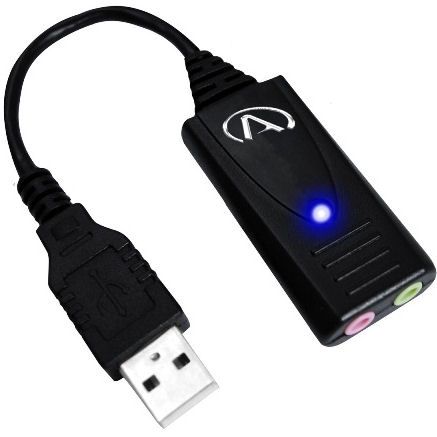
Martel-listed USB-SA audio adapter with attached lead and USB Type-A plug
USB-SA adapter from the Martel catalog. The photograph identifies the audio adapter used in a possible path. Record the exact hub you test separately.
In this guide

A reporter who can record through a microphone alone may still lose the intended input when a hub, writer and playback pedal join the desk. Begin with a deliberately small practice job. Keep two records side by side, one listing physical sockets and one listing the functions the application actually received. A connector can remain in place while Windows or the application changes its device selection.

Draw the desk from the reporter’s point of view

Start with three lines on a piece of paper. Write “writer to job” on the first, “microphone to recording” on the second, and “pedal to playback” on the third. Finish each line with something the operator can see or hear. A stroke appears in the practice transcript. A spoken identifier is audible in the saved audio. A pedal action moves the playhead in a supported program. A port map built this way stays useful when a device appears to be connected but its output goes elsewhere.

On the left side of each line write the actual product name. In the middle, enter every physical connection as you encounter it. For example, an analog stenomask may connect to a separate USB audio adapter, which plugs into a laptop or a hub. For that route the Windows recording device is associated with the adapter. A different analog microphone plugged into the same adapter can leave the same Windows name on the screen. The physical part of the sketch gives the name on the screen a meaning.

Add a fourth line for listening. Begin with the program doing the playback and finish at the speakers or headphones you expect to hear. A desk may use the same USB device for input and output or use completely separate devices. If a practice recording seems silent, the listening line gives you a short task to do before changing anything along the microphone line. Open a known recording, select the intended output and see whether you can hear the familiar passage.

Give the finished drawing an orientation. A note saying “left side, socket nearest the hinge” is easier for a relief reporter to follow than “first USB.” Make the description from the seated reporter’s perspective with the lid open. If the laptop normally sits on a stand, describe the usual orientation. A close photograph of the actual connections, kept with your own equipment notes, can resolve a surprising number of questions on a desk with several black cables.

Identify which Martel products belong on each line

The Elite Court Reporter Laptop is the computer endpoint in this guide. Identify the actual configuration you are purchasing or already own. A product-family photograph is enough to recognize the laptop in this article. The ports available at your desk depend on the machine actually supplied. Check its configuration and inspect the openings before buying a hub to solve a problem you may not have.

The Elite HGMUSB court reporter microphone creates a USB microphone path. For that arrangement, write down the microphone, its USB electronics, the cable path and the receiving application. If the job is to capture table audio in reporting software, the decisive artifact is the recording associated with that practice job. A clean file in Windows Sound Recorder provides a reference for the Windows input. Follow it with a file made by the reporting application.

The Martel-listed USB-SA audio adapter belongs on a different sketch. On that sketch an analog microphone feeds the adapter, and the adapter supplies the USB connection to the computer. Keep the analog input, the optional listening connection and the USB plug identified separately. Before comparing two laptop ports, check that you used the intended adapter input both times. It is possible to move the correct USB plug while connecting the wrong analog lead.

The USB foot pedal for Case CATalyst AudioSync belongs on the control line. Its product listing identifies a particular reporting and playback use. Determine what the selected program and setup support, then choose a specific transport action to test. Moving the playhead in the correct practice recording demonstrates something useful about that path. It says nothing by itself about whether the microphone recorded the witness position.

Decide what “direct” means on your particular computer

A direct reference uses a compatible laptop socket and the supported cable or adapter required by the device. If an adapter is unavoidable because the supplied device plug and laptop socket have different forms, describe that reference accurately. “Microphone with its supplied lead through my identified adapter into the left laptop socket” is a reproducible description. Simply writing “direct” would leave a second reporter unable to assemble the same path.

A hub creates another step in the path. Record the make and model from the unit you have, the upstream cable that joins it to the laptop, the downstream socket chosen for the particular device, and its power arrangement. A dock built into a monitor and a small travel hub may look alike from within the recording application. They are different physical arrangements and deserve separate lines on the worksheet if you use both.

Avoid inferring a device’s capabilities from the way the plug looks. A USB-C shaped connection used for a charger does not demonstrate that a particular chain supports the data task you want to perform. Inspect the specifications for the actual port and cable. If a supplied device lead must be replaced for the second route, record the new lead as another change. A clean comparison is possible only when a reader can see which parts traveled together.

Here is a common planning mistake. A reporter counts three empty openings on a hub and concludes that a writer, microphone, and pedal have been accommodated. That count establishes only how many plugs appear to fit. The job also needs supported device connections, sufficient power for the intended combination, selection of the correct audio endpoint and a program that handles each input. Put those four questions beside the opening count before deciding which equipment belongs in the travel bag.

Prepare a short job whose results you can recognize

Use invented words and an empty practice job. For the microphone, choose two similar phrases with different endings. “Copper folder, page fourteen” and “copper folder, page forty” work because the ending must remain intelligible. Speak at a representative volume from a specified position. Leave a pause, then say the second phrase. Write the expected words on a card that you can refer to during review. Save the audio under a name that includes both route and take.

For the writer, choose a short sequence you know how to produce in your own software. Write down the expected text before the test. Include a familiar correction or punctuation action if it belongs to your ordinary workload. Open a new practice job, enter the sample, save it and reopen it. Record whether the expected sequence remains in the saved job. A connection that supplied strokes to some other open window would produce a different observation.

For the pedal, choose a file you already know contains audible speech. Start at a short passage with a distinctive word. Note the position on the player before pressing the selected control. Perform the supported action, observe the audible phrase or playhead position, and release the pedal. Record what happened on release as well. A continuous hold-to-play command and a toggle command can both start playback while behaving differently when the operator puts a foot back on the floor.

These three artifacts have different jobs. The writer test yields saved text. The microphone test yields a saved recording. The pedal test yields a documented transport behavior in a named application. Store them together under the same practice session ID. That arrangement makes it possible to report that two functions passed while one remained unresolved without calling the entire computer “good” or “bad.”

Compare two routes with one device

First connect the microphone through the minimum supported path. In Windows 11 open Settings, select System, then Sound, and locate the input you intend to use. The names shown depend on the equipment and installed software. Take note of the selected input. Open Windows Sound Recorder, choose the intended input there when a selector is offered, and make the short practice recording. Stop the recording and play the finished item through the listening output you identified.

Move the same microphone to the intended hub path after the practice application has stopped recording. Keep the same room, microphone position, voice and output. Check the selected input again. Record the comparison passage in a fresh file. If a selection changed when you moved the connection, identify both the automatically chosen device and the one you selected for the corrected test. The two observations answer different questions about a desk that may be reassembled every morning.

Listen to the two saved takes close together. Can you identify the correct last word in each phrase? Did the opening survive after the pause? Is a new noise associated with movement of the cable, or is the level simply different? A result such as “both takes contain four and forty clearly, but the hub take began on the second syllable of copper” gives another person a concrete observation to investigate. A general statement that the hub had “worse quality” gives very little direction.

If both takes sound alike through the reference player, repeat the supported recording task in the reporting application. Check the specific device chosen there. Some programs keep their own selection. Create a new practice recording and reopen the saved job. If Windows Sound Recorder succeeds on both paths but the reporting program uses the built-in microphone only on the hub route, you have narrowed the question to application selection or initialization under that connection arrangement.

Build up the simultaneous workload in a useful order

The order depends on the most important function. A reporter whose main output is a written job might start with the writer, add the room microphone, and add the playback pedal last. A voice writer may begin by establishing the mask input through the appropriate connection. Write down the sequence you used. The last device added is a clue to a change in behavior. It is not evidence by itself that the newly added device is defective.

The following worksheet represents test conditions a reporter can run. Each row names the observation that distinguishes it from the previous row. The result column is deliberately a question. Use the real equipment and enter what happened before deciding which route to adopt.

ConditionConnections under examinationObservation to enter
W1Writer connected through its supported minimum pathDid the new job reopen with the expected sample strokes?
M1USB microphone alone on its minimum pathWhich device and application produced the saved room phrase?
P1Supported pedal alone with a known spoken fileWhat happened to playback on press, hold and release?
WMWriter plus microphone, using the proposed desk connectionsDid the expected text and recorded words survive in the same practice job?
WMPWriter, microphone and pedal togetherCan the operator type, save new audio and control known playback without losing a device?
RETURNAll required devices after ordinary disconnection and reassemblyWhich physical labels and application selections had to be restored manually?

If W1, M1 and P1 pass but WM fails, there is little reason to begin by altering the pedal. It was absent from the first unsuccessful combination. Start with the two-device configuration, the selected input, the reporting program and the upstream route they share. If WM succeeds and WMP changes the recording selection, return to the two-device arrangement and repeat before investigating the three-device case. Preserve the successful file alongside the unsuccessful one.

When a situation is intermittent, add time to the worksheet. A ten-second task establishes that the desk can start. It gives you little information about a thirty-minute class problem. Choose a representative duration based on when the symptom usually appears. At predetermined points, enter a harmless written marker and speak an identifiable phrase. The saved job will then tell you how far each function continued even if the problem was discovered only at the end.

Read three fictional desk reports

In the first illustration, the reporting application lists “USB Audio” on both routes. Both saved recordings contain the practice phrase. A reviewer notices that the hub take contains keyboard noise from a position much nearer the laptop. The name alone cannot settle which physical microphone was active. Repeat the take with the intended microphone position clear and an observer reading a source-specific phrase from that position. Check the application selection and the resulting file before blaming the hub for an acoustic change.

In a second illustration, the writer, microphone and pedal each work alone. After the powered hub is added, the writer still produces the expected text, but the reporter hears nothing on playback. A reference recording that contains speech is also silent. The next question concerns the listening path. Has the application selected another output? Is the expected headset connected to the correct device? Once the known recording is audible, reopen the new microphone take and determine whether it actually contains the phrase.

In a third illustration, room sound is clear and the written practice sequence is correct. Pressing the pedal advances a different open player. Disconnecting the microphone would disturb a working part of the desk. Record which program owned the pedal action, which window had focus and which file was active. Repeat the same action with the intended supported program alone. A change tied to the active program deserves a different purchase decision from a USB device that disappears from Windows.

These are short examples of how to interpret evidence. They describe possible observations, not results measured on a specific hub or on every Martel laptop. Your own report is stronger when it uses actual names and saved outcomes. “Both devices remained in Windows. The second player began playback when I pressed the center pedal” is a testable statement. A colleague can reproduce the program combination and seek the same behavior.

Add a remote session only after the local desk works

A call introduces another input selector, another output selector and a remote listening point. Start with a practice meeting that participants have agreed to use for testing. Confirm that the local job can save the room microphone while no meeting is open. Then start the remote software, record its selected microphone and speaker names, and repeat the local sample. Add one known remote phrase and one known local phrase if your authorized setup is intended to preserve both.

Ask the remote participant which particular phrase reached them. A participant confirming that they “heard something” does not distinguish the laptop microphone from the microphone at the table. A statement such as “I heard copper forty from the marked table position, and I missed the word copper in the other phrase” identifies a specific observation. The saved local job should be checked separately because the remote application's transmitted signal and the reporting application's recorded signal can follow different paths.

Imagine the participant hears the external microphone clearly on the direct route and on the hub route, while the locally saved practice job lacks the remote return in both cases. That pattern points you toward the available recording paths and application setup. It does not establish a hub defect. Conversely, a local job that survives while both the incoming call sound and an ordinary reference recording move to another output gives you a reason to review playback selection after connection.

Write the minimum observations that the relief reporter needs. Which input is selected in Windows? Which input and output does the meeting application show? Where does the reporting program save the local job? Which phrase should the remote participant identify? Put the answers on a separate page from confidential meeting notes and keep the practice file harmless enough to repeat with a colleague. A reproducible desk setup is more useful than one remembered by a single operator.

Run the reconnect trial that matches your working day

Consider which connections actually travel. At one office the hub stays on the desk with the peripherals connected, and the laptop is removed at the end of the day. At another office each cable goes into a case. Those arrangements call for different return tests. In the first case, reconnect the laptop to the same upstream hub lead after closing the practice job normally. In the second, use the labels to reconstruct the entire desk from the packed pieces.

Before reassembly, identify which files are already closed and saved. After reconnecting, start a new practice item with a new identifier. A previously opened file that still plays tells you something about playback. A newly made recording tells you whether the input returned. Open the new job again before marking the return trial complete. Using the same reference words but a different number on each run prevents yesterday’s successful sample from passing today’s test by accident.

If you regularly move from battery operation to desk power, record which state was present during each run. Keep the first route comparison on one stable power arrangement. A later trial may deliberately reproduce the normal transition if the equipment manufacturer’s instructions support it. A result obtained after changing both the hub and the power state cannot isolate which change accompanied the symptom. It can still describe what the reporter encountered during an actual reassembly.

A clean, short return note might read “Reference day, left-rear laptop socket, intended hub power connected, writer path W, microphone path M and pedal path P. New practice job had all six words. Center pedal resumed playback in the named player after one selection adjustment.” Replace every field with observations from your own desk. If an adjustment is needed repeatedly, give it a place in the handoff so that the next user knows what normal preparation involves.

Decide whether a second hub trial will teach you anything

A different hub can be a reasonable next comparison when the direct route works reliably, the reviewed application supports the device and the first hub route repeatedly fails under a documented workload. Keep the original successful sample. Select the alternative hub using its documented data connections and power requirements, then repeat the same task. A different connector, cable and software version introduced together make it difficult to explain which part deserves credit for an improved result.

If the second route succeeds, record exactly what succeeded. A statement such as “the identified adapter supplied the expected USB microphone input to Sound Recorder, and the saved phrase remained audible after ordinary reassembly” has a clear scope. Extend the test to the reporting software and simultaneous writer use if those tasks matter. Keep separate results for the minute-long reference and the longer practice run. That is the information a school purchasing several stations can compare across its own configurations.

A user buying a travel hub may care more about easy reassembly than the speed of copying a large file. A desktop installation may need several individually labeled downstream ports, a stable route for the upstream lead and somewhere practical to place the hub. A successful recording beside a laptop sitting flat on a table does not address how the cable fits once the computer is raised onto its normal stand. Include the physical handoff and a final saved phrase in the decision.

If neither route works in the minimum supported configuration, changing hubs again is unlikely to answer the immediate question. Check the identified device, its supported receiving application and the configuration of the input or control that failed. Take the test results to Martel with the actual product details. Selecting a different microphone, adapter or foot control is easier when you can identify which basic operation still lacks a successful reference.

Use a purchasing note that stays understandable next semester

Begin the note with the intended user. A voice-writing student who needs an analog mask, USB adapter and reporting software has a different recording path from a stenographic reporter adding an HGMUSB room microphone. Someone who transcribes recorded audio may have a critical pedal requirement even if they never use a writer. Describe the required tasks before listing a preferred hub. Martel can compare the intended role with the descriptions of the equipment you are considering.

Include the exact laptop configuration, the connection used by each existing device, the name of the application expected to receive it, and whether the operations must occur simultaneously. Add the hub’s model if you already own it. If a device requires its supplied adapter or power unit, identify that part. An equipment list containing only “laptop, microphone, pedal” leaves too many possible combinations to support a useful compatibility conversation.

State the test the purchaser expects to perform. One example is a school station that must accept an invented paragraph from the writer, save a matching room phrase, reopen the job, and operate a supported playback action after the desk has been packed and reconnected. A prospective buyer can ask which parts the package supplies and which parts are already owned. A claim about generic USB compatibility cannot answer that entire operating requirement.

Finish with the evidence a second person can follow. Keep the physical map, the device names the applications displayed, the successful reference file, and the description of any change needed after reconnection. Put a date beside the Windows and application versions you actually checked. When the school changes software or replaces the hub, staff can see where to begin again. A small set of identified, harmless results gives the next reporter a way to prove the desk is ready for their work.

Interpret a completed comparison without guessing the faulty part

Consider a hypothetical six-row sheet from a classroom. With the writer connected directly, a student saves “blue tab, red tab” and finds both phrases on reopening. With the microphone on the left socket the student records “copper fourteen” clearly. Moving the microphone to the hub initially produces a file containing the instructor's voice from beside the laptop. After the student chooses the named external input in the reporting software, a new file contains “copper fourteen” from the marked seat again. This is an invented reading exercise.

What equipment should the school purchase from that result? The sheet establishes no need for a replacement microphone. It documents a selection change after the microphone moved, followed by successful capture through the intended route. An appropriate next check would be to close the practice job, reconnect the same hub in the usual way, and see whether the change recurs. If it does, a short station instruction identifying the right input could make that arrangement repeatable for the people using it.

Now add a sixth row that reads “the initial practice file was audible, but the new job had no speech after the pedal was reconnected.” The sample raises a question about the combination. It leaves several explanations open. Did the recording program retain the external input? Did playback move to another output? Did the writer still enter text? Did the local recording continue to increase in duration? Answer those questions in the least disruptive order. Reopening the working reference recording through the intended speakers is a quick way to establish whether the listening path still works.

A support note based on this sheet might read “After reconnecting the pedal to the hub we could still enter practice strokes. The recording indicator advanced through the twelve-second sample. The old reference file played through the chosen speakers. The new recording did not contain either test phrase. We are attaching the device selections as seen before and after reconnection.” The note does not contain a confidential job and it gives support a precise comparison to request next.

If the instructor later uses a different cable, writes with a different application, or tests only the built-in microphone, record that run under a new heading. The evidence from the original desk remains useful because its boundaries are clear. A buyer trying to choose between using the laptop's existing connections and adding a hub can now make a concrete decision about cable layout, available sockets, supported device behavior and the amount of reconfiguration the operator can accept.

Practical questions and answers

1. Which device should I check first on a crowded USB desk?

Start with the one that supplies the result you cannot do the job without. For a USB microphone, record a new phrase and play it back. For a writer, confirm the intended input reaches a practice job. Record that baseline before testing several devices together.

2. How do I identify the direct connection?

Draw the path from the device to the computer and mark every adapter, dock or hub along it. A port on a monitor or keyboard may be part of another device. Record the laptop model and the physical port as well as the name Windows shows.

3. Does USB-A or USB-C tell me whether a hub will work?

Those names describe connector forms. The actual laptop, hub, power arrangement, peripheral requirements and application support still matter. Use the product documentation to identify what the connection supports and repeat the intended operation through that exact route.

4. What should I record about an analog mask on a USB adapter?

Write down both the mask model and the adapter. Windows may identify the adapter while saying nothing about which microphone is plugged into its input. Preserve a short recording from the working path before reconnecting the adapter through a hub.

5. Should I test all connected devices at once?

First identify what each device does by itself. Then add the combinations required for a real assignment. A job that requires a writer, room microphone and pedal should eventually include all three. The earlier stages are references for locating a change.

6. How do I know that the external microphone is the source?

Check the selected input in the receiving program and record distinct practice words through the intended setup. Play the saved file. The laptop's built-in microphone can hear the room while an external device is connected, so a moving meter alone leaves the question open.

7. What is a meaningful writer test?

Use the normal supported connection and enter a few recognizable items in a new practice job. Save and reopen it as you normally would. Seeing a device name in the system does not prove its output reached the correct reporting application.

8. How should I test the USB pedal?

Choose a known phrase in a supported player and note transport behavior on press and release. Repeat at the same phrase after moving to the hub. Document any change in playback position separately from a change in microphone sound.

9. What does an externally powered hub establish?

It identifies the power arrangement you tested. It does not establish compatibility for all connected devices or every other hub. Record the exact model, its supplied power source and whether connecting the final peripheral changes the application's behavior.

10. Why label two identical-looking laptop ports?

Physical location helps a colleague reproduce the tested setup. Name each one in ordinary terms, such as left rear or right front, with a small equipment diagram if needed. Appearance alone does not settle whether the internal connections behave identically.

11. What belongs in a reconnect trial?

Close or stop the practice operation normally, reconnect using the intended arrangement, then inspect the selected devices before starting a fresh job. Record whether the same input name returned and whether the new saved sample contains the intended source.

12. How do I compare the hub without giving it an easier job?

Keep the software, operator, power, microphone position and file task consistent. Use comparable invented phrases and the same review method. If changing connections also requires a different cable, record that difference and avoid attributing the entire result to the hub.

13. What if the direct test fails too?

Return to the minimum supported route and confirm recording or input selection there. A failure common to direct and hub connections does not identify the hub as the cause. Keep both observations for Martel or the relevant software support team.

14. Why should I check headset playback separately?

A newly connected audio device can change the listening output, even when the recording input remains correct. Play a familiar sample through the selected output before diagnosing a silent microphone recording. Note whether the chosen endpoint is for listening or capture.

15. Can a hub make a device work in unsupported software?

A hub provides a connection path. A program still needs support for the device and the commands or audio formats the operator expects. Confirm the working combination with the intended software edition and a permitted practice job.

16. What if a second device disappears when the last one is added?

Record the exact addition, the device that disappeared and whether it vanished from the operating system or only from the application. Repeat once with a harmless job after restoring the known baseline. These details help distinguish detection from application selection.

17. How should I document an intermittent disconnect?

Note the time, active task, power source, physical connection and whether an input name changed. Save any nonconfidential sample that captures the interruption. Avoid repeatedly twisting or stressing a suspect cable just to produce another example.

18. Should a successful short test settle a long class requirement?

It establishes only the short tested operation. If the issue normally begins later, repeat the ordinary class workload for a representative period and mark when any change occurs. Keep the setup stable so the longer result can be compared with the shorter reference.

19. How should I describe my planned setup to Martel?

Name the Elite laptop configuration, exact peripheral models, intended hub, available ports and the operations that must occur simultaneously. Ask about the actual combination rather than a universal hub recommendation. Include the receiving applications when you need pedal or writer support.

20. What should remain in the equipment handoff?

Keep the working port map, device and power labels, application selections and one harmless reference job. A relief operator should be able to reconnect the desk and verify the writer, microphone and pedal independently before accepting a real assignment.