Updated · By Martel Staff
For legal professionals choosing a dedicated dictation recorder, the Olympus DS-9500 and Philips PocketMemo DPM8000 offer different approaches to recording and moving work to a transcription workflow. Compare the controls, transfer method, software and security configuration that your office actually needs.
Olympus DS-9500: Wireless Connectivity and Recording Control
Features for legal dictation
The DS-9500 uses a slide switch for recording control and a two-microphone system with recording modes for different surroundings. Select the mode appropriate to close dictation or a meeting and make a test recording in the intended room. Microphone processing can help with background noise, but cannot recover every word or guarantee clear audio in every environment.
Connectivity
Built-in Wi-Fi can transfer dictation through a configured workflow without returning to a USB connection each time. For the documented ODMS Cloud email workflow, the DS-9500 sends to an inbox monitored by the ODMS Cloud Desktop App, which then uploads the files. Configure the receiving transcriptionist and Author ID; Wi-Fi alone does not establish that cloud handoff. OM SYSTEM DS-9500 cloud workflow instructions. Wi-Fi transfer is not a promise of unrestricted remote access to the device.
Security
The DS-9500 supports PIN protection and 256-bit AES file encryption. These protections must be configured correctly and used with a compatible recording format and receiving software. Confirm the encryption settings in the current manual and test that authorized staff can open the files. A recorder’s security features are one part of protecting client information; access, transfer, storage and retention also matter.
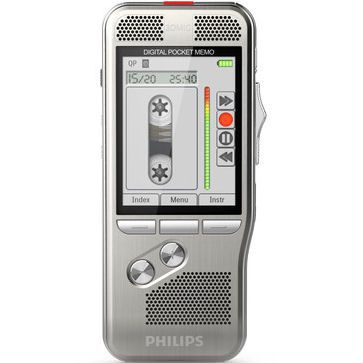
Philips DPM8000: Recording Features and a Docking Workflow
Recording quality and controls
The DPM8000 combines Philips’ 3D Mic system with a slide switch and a motion sensor that can select a microphone mode based on device use. That automatic selection is a convenience rather than a guarantee that distant voices or noisy rooms will be recorded clearly. Test the microphone position, input level and playback with the kind of dictation you produce.
File transfer and transcription
A USB or docking-station workflow can move recordings to a computer for handling in compatible dictation software, including SpeechExec configurations. Included software and accessories depend on the exact package. Verify licenses, operating-system support and the transcriptionist’s file-format requirements before ordering.
Security features
The DPM8000 offers file encryption and PIN protection. As with the Olympus recorder, these features require configuration and compatible software. They do not independently establish legal, privacy or medical compliance for an entire office workflow.
Choosing the Right Dictation Machine for Your Legal Practice
- Consider transfer needs. If wireless delivery matters, assess the DS-9500’s supported Wi-Fi workflow. If desk-based docking is preferred, review the DPM8000 package and software.
- Try the controls. Check how easily you can record, review and correct dictation while handling case notes.
- Confirm compatibility. Ask about the specific operating system, software version, file format, foot control and licenses used by your transcription staff.
- Plan secure handling. Test encrypted-file delivery, authorized access, backups and retention before using confidential client material.
- Check the package. Availability, included accessories, support and software licensing can change; use the current listing and manufacturer documentation.
Both recorders can support a professional dictation workflow when the equipment and software fit the office. Browse dictation machines and compare the current specifications with your existing transcription setup.
Manufacturer references
Related Martel equipment
Common Questions and Answers
Which is better for a law office: DS-9500 or DPM8000?
Match the recorder to the office’s editing, transfer and transcription process. Compare a corrected sample file through the complete workflow rather than assuming one model is best for every author and typist.
Do the two recorders transfer files the same way?
The DS-9500 offers configured Wi-Fi workflows as well as supported wired transfer. The DPM8000 uses its supported USB or docking workflow. Confirm the exact equipment, software and setup included in the quoted package.
Does a slide switch guarantee the same editing features?
No. Both model and recording format matter. Check insert, overwrite and append support for the format you plan to use, then try a short correction before purchasing.
Will software licenses and accessories always be included?
Read the current package contents for each offer. Confirm the author and typist software, license terms, docking or cables, headset and foot control needed for a complete working system.